
Foreign Currency · Track 1 · Tutorial 2 of 3
Set historical rates for equity and retained earnings
A foreign company’s share capital and reserves stay at the rate when they arose; only its assets and liabilities move with the closing rate. BrizoConsol fills each historical rate for you. Check them, and enter the real ones where you have them.
1Know what the historical rate does
Company B keeps its books in AUD. Its share capital of AUD 100,000 was in place when Your Group bought it in March 2021, when the rate was 1.0500 AUD to 1 SGD.
| At the historical rate | 100,000 ÷ 1.0500 = SGD 95,238.10. This is what the group eliminated against its investment on the acquisition date, and it doesn’t change. |
|---|---|
| At October’s closing rate | 100,000 ÷ 1.1200 = SGD 89,285.71. |
| The difference | SGD (5,952.39). BrizoConsol posts it each month against the CTA reserve, so Company B’s share capital comes out of the group’s figures exactly as it was eliminated, and the difference sits in the reserve. |
A wrong historical rate doesn’t change the group’s total equity, but it moves the split between share capital and the CTA reserve, which your auditor will check.
2Open the company’s rates
- Select Your Group, and open Adjustments → Currency translation → Settings.
- Under Companies, click Company B.
- Find Equity — rate on the day it came in.
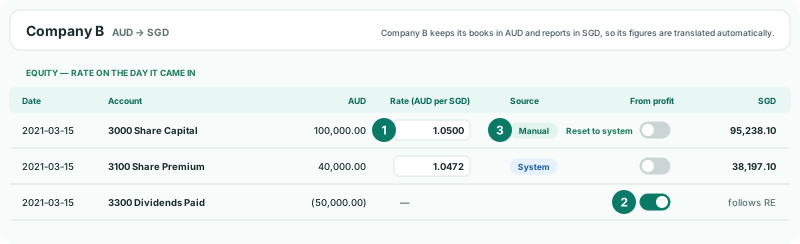
Each row is a share capital or reserve account, with its Date — the acquisition date, for a company the group bought — the AUD amount, the Rate (AUD per SGD) it is translated at, and the amount in SGD. The Source says where the rate came from:
| System | From Exchange Rates, for the row’s date. |
|---|---|
| Manual | A rate you entered. |
| No FX rate | Exchange Rates has no rate for that date. Add it there, as in Manage closing and average exchange rates. |
3Enter the real rate
- In Share Capital’s Rate (AUD per SGD), type the rate on the acquisition date: 1.0500.
- Click outside the field. The rate is saved, the Source changes to Manual, and the SGD amount shows 95,238.10.
The CTA is posted again straight away with the new rate. Rates are entered the same way round as on Exchange Rates: units of the company’s currency per 1 SGD. Use the acquisition-date rate for capital and reserves the company had when the group bought it, and the rate on the day of issue for shares issued later. To go back to the rate from Exchange Rates, click Reset to system.
4Mark equity that moves with the year’s results
Some equity accounts don’t hold capital put in on one day: their entries come through the year, like the profit itself. Company B’s 3300 Dividends Paid is one.
- On the 3300 Dividends Paid row, turn on From profit.
The account no longer has a rate of its own: its SGD amount reads follows RE. Instead, the year’s movement on it is translated at the average rate, like profit, and its difference from the closing rate goes to the CTA as P&L-related equity. Use it for dividends and for transfers from the year’s profit; leave share capital, share premium and reserves with a historical rate.
5Check the retained earnings rates
- Find Retained earnings — rate for each year.
- For each Year, read the Opening RE (AUD), its Rate (AUD per SGD) and the SGD amount.
Each year’s rate starts at that year’s average rate. If your group’s earlier accounts, prepared before BrizoConsol, carried Company B’s retained earnings at different rates, enter those rates here, so the group’s opening retained earnings agree with what was reported. The rate is saved when you leave the field, and the CTA is posted again. Reset to system returns it to the year’s average.
Check
Open Adjustments → Currency translation → CTA Report for YTD, Oct-2026, and click Company B’s row. Rates used lists the equity rates you set, and on CTA / FCTR every Auto CTA Journal row’s Diff is 0.00.
6If something goes wrong
| The account has no rate field | From profit is on for that account. Turn it off to give it a rate of its own. |
|---|---|
| No equity accounts found for this entity. | The company has no share capital or reserve movements loaded yet. Load its history, as in the Foundations series. |
| The company is listed under Already in SGD — nothing to set | The company is in SGD, like the group, so it isn’t translated. |
| Share capital moves every month on the group balance sheet | The account isn’t mapped for the CTA. See Map CTA posting accounts. |
Want more detail? See the documentation