
Foreign Currency · Track 2 · Tutorial 1 of 4
Follow a foreign company’s translation line by line
A foreign company’s figures reach the group at more than one rate: the balance sheet at the closing rate, profit at the average rates, and equity at the rates when it arose. The CTA is what is left. The CTA Report shows every rate used and how each part of the CTA was worked out.
1Know which rate each line uses
Company B keeps its books in AUD; Your Group reports in SGD. Rates are units of AUD to 1 SGD, so each figure is divided by its rate.
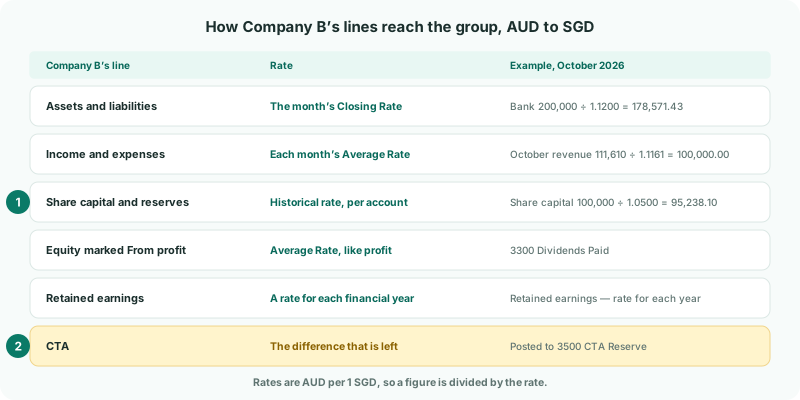
| Line | Rate |
|---|---|
| Assets and liabilities | The Closing Rate of the month. In October, Company B’s bank of AUD 200,000 is SGD 178,571.43 at 1.1200. |
| Income and expenses | Each month at its own Average Rate. The year to date is the months added up, so it isn’t the year’s AUD total divided by one rate. |
| Share capital and reserves | The historical rate of each account, from Equity — rate on the day it came in on the CTA settings: Company B’s share capital stays at 1.0500. |
| Equity marked From profit | The average rate, like profit — for Company B, 3300 Dividends Paid. |
| Retained earnings | A rate for each financial year, from Retained earnings — rate for each year. |
| CTA | Translated at these different rates, the balance sheet no longer balances. The difference is the CTA, posted to 3500 CTA Reserve. |
2Open the company’s CTA Report
- Select Your Group, and open Adjustments → Currency translation → CTA Report.
- Choose Actual as the Scenario, YTD as the Basis, and Oct-2026 as the As at period.
- Under CTA by company, click Company B’s row.
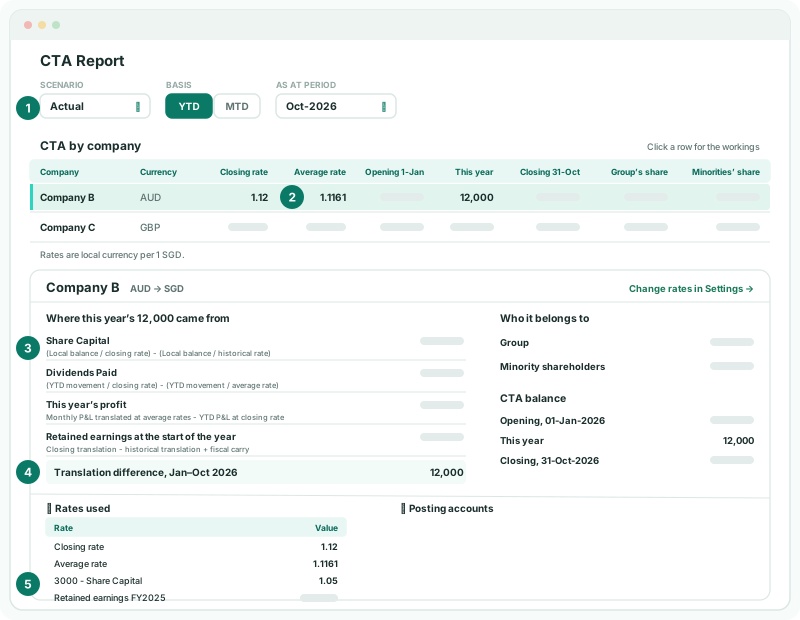
Company B’s workings open below the table, with AUD → SGD beside its name. Open Rates used to see the rates used for the company:
| Closing rate, Average rate | The As at period’s rates from Exchange Rates: 1.1200 and 1.1161 for October. They are also in Company B’s row of the table. |
|---|---|
| Each share capital and reserve account | Its rate: 3000 - Share Capital at 1.0500. |
| Retained earnings FY2025, FY2026 | The rate for each year’s retained earnings. |
3Follow each component
Where this year’s 12,000 came from splits the CTA posted for the company into four components, each line with its formula under it. Equity has a line for each account; the other two components read This year’s profit and Retained earnings at the start of the year. Posting accounts lists each line’s component, its account and its amount.
| Component (line) | Formula | What it means |
|---|---|---|
| Non-P&L Equity Translation (each account’s name) | (Local balance / closing rate) - (Local balance / historical rate) | Share capital and reserves held at their historical rates, measured against the closing rate. |
| P&L-Related Equity Translation (each account’s name) | (YTD movement / closing rate) - (YTD movement / average rate) | The year’s movement on equity marked From profit, such as dividends, at the average rate against the closing rate. |
| Current Year Earnings CTA (This year’s profit) | Monthly P&L translated at average rates - YTD P&L at closing rate | The year’s profit, translated month by month, against the same profit at the closing rate. |
| Retained Earnings CTA (Retained earnings at the start of the year) | Closing translation - historical translation + fiscal carry | Retained earnings at the closing rate against their rates by year, carried from one year to the next. |
Work the first one by hand for share capital: 100,000 ÷ 1.1200 − 100,000 ÷ 1.0500 = 89,285.71 − 95,238.10 = (5,952.39). That is the difference on Company B’s share capital to date, kept in the CTA reserve so share capital stays at what the group eliminated against its investment.
Switch Basis to MTD to see one month’s components on their own.
4Check the rates and the total
- Open Settings → Global Settings → Exchange Rates for 2026, Actual, and look at AUD for October.
- Open Adjustments → Currency translation → CTA / FCTR for Actual and Oct-2026, and click Company B’s row under Auto CTA Journals.
Check
The Closing rate and Average rate on the CTA Report are October’s rates on Exchange Rates, 1.1200 and 1.1161. Each account under Posting accounts is one the journal posts to, and the journal’s Diff is 0.00. The translation difference for the year is 12,000.
5If something goes wrong
| No posted CTA calculation lines found for this selection. | No CTA is posted for the company in that period. Check the CTA settings for anything left to fix; saving a CTA setting posts the CTA again. |
| A rate shows - | Exchange Rates has no rate of that type for the month, or the company has no historical rates yet. Add the rate, as in Manage closing and average exchange rates. |
| The rates differ from Exchange Rates | A different Scenario is selected. Budget and Forecast use their own rates. |
| Non-P&L Equity Translation is larger than expected | A share capital or reserve account has the wrong historical rate. Correct it under Equity — rate on the day it came in on the CTA settings, as in Set historical rates for equity and retained earnings. |
| Company B isn’t in CTA by company | Only a company whose currency differs from the group’s has a CTA. Check Company B’s currency, then the CTA settings for anything left to fix. |
Want more detail? See the documentation