
Intercompany Eliminations · Track 2 · Tutorial 6 of 8
Only eliminate when an invoice or bill names the other company
A rule normally posts every month in its effective period that has amounts on its accounts. If the item should only be eliminated when there is a document behind it — Company A’s invoice to Company B — add a name criterion. Months without one are not posted; they wait in Elimination Review.
1Know what the criterion checks
For each month the rule would post, BrizoConsol looks at the posted invoices and bills of both companies in the rule, dated in that month, and asks whether any of them has a customer or supplier name you chose:
| One does | The month is posted as the rule’s method says. |
|---|---|
| None does | The month is not posted. It is listed in Elimination Review with the reason, for example: No invoice or bill in October 2026 names Company B Pty Ltd, so this entry was not posted. |
The criterion decides whether a month is posted, not how much: the amount still comes from the accounts in the rule. To eliminate only particular invoices and bills, use a document entry instead, as in Eliminate from invoices and bills.
2Know when to use it
Use it when an amount on the accounts without a document behind it is a warning sign. Company A invoices Company B its management fee every month. If 4900 has an amount in a month with no invoice to Company B, something else has been booked there — an accrual, a correction, a mispost — and your team wants to look before it is eliminated.
Don’t use it for items that never have invoices or bills, such as loan balances or dividends: every month would be held.
3Add the names to the rule
- Open Intercompany → Elimination Rules and click Edit on the management fee rule.
- Under Only eliminate when an invoice or bill names, find the lists of Customers and Suppliers. They hold the names on the posted invoices and bills of Company A and Company B.
- Type in Search names to narrow the lists, and tick Company B Pty Ltd under Customers — the name Company A invoices Company B under.
- Click Confirm.
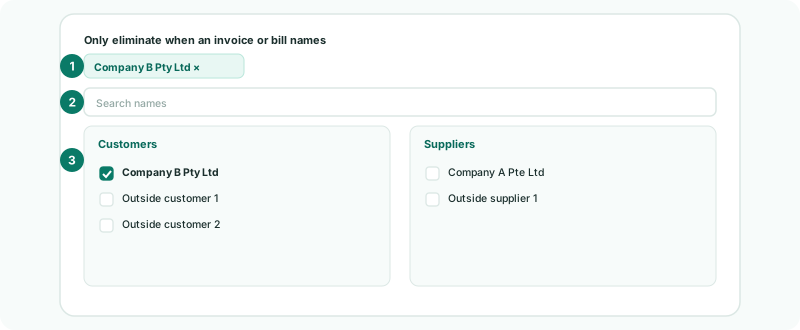
Chosen names appear above the search; click × on one to remove it. The names are one list for the whole rule: a document with any of them is enough. To cover Company B’s side too, also tick the name Company B’s bills give Company A, under Suppliers.
4Deal with a month that is held
- Open Intercompany → Elimination Review for the month.
- Read the warning on the rule’s row, and find out what is on 4900 without an invoice.
- If the invoice exists but has not been loaded, reload the company: the month is then posted on its own.
- If the amount should be eliminated anyway, click Review and post, check the entry, and confirm it. If it should not, click Reject.
Check
Months with an invoice to Company B are eliminated as before. Any month without one is listed in Elimination Review with the No invoice or bill … names … reason, and stays in the group figures until someone decides.
5If something goes wrong
| Choose the from and to organisations of a line first: the names come from their invoices and bills. | The rule has no companies yet. Choose them under Leg Scope or Elimination lines first. |
| No customer names on these companies’ posted invoices. | No invoices are loaded for the rule’s companies, or none are posted. Load them first; without documents the criterion would hold every month. |
| Every month is held | The chosen name is not on that company’s documents, or the invoices are dated in a different month from the amounts on the account. Check the name and the invoice dates. |
| A month with a mispost was eliminated | An invoice naming the company exists that month, so the criterion passed. It checks that a document exists, not that it matches the amount. |
Want more detail? See the documentation