
Intercompany Eliminations · Track 2 · Tutorial 4 of 8
Method 4: review and approve every month
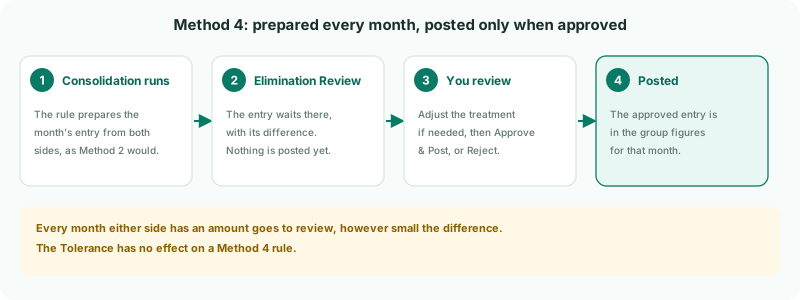
Some items should never be eliminated without a person looking at them. A Method 4 rule does the preparing — the companies, accounts and amounts — and then waits. Nothing reaches the group figures until someone approves it.
1Know when to use Method 4
Use Method 4 for items that need sign-off every month: large balances, items an auditor will ask about, or a relationship where the amounts often need correcting. It saves the typing of a manual entry but keeps the decision with a person.
Your Group’s plan clears Company A’s loan to Company C with a GL entry. If your team would rather have the entry prepared every month and only approve it, a Method 4 rule does that.
2Add the rule
- Open Intercompany → Elimination Rules and click Add an Auto Elimination Rule.
- Set Effective from month to the first month to prepare, and leave Final month (inclusive) empty.
- Enter the Description Company A loan to Company C, and choose the Intercompany Type Intercompany Loans.
- In Method, choose Method 4: Review and approve before posting.
- Under Leg Scope (Entity + Multiple Accounts), choose Company A and 1300 Loan to Company C on the From side, and Company C and 2400 Loan from Company A on the To side.
- Click Confirm.
The Tolerance field has no effect on Method 4: every month either side has an amount is prepared and sent for review, however small the difference.
3Know what is prepared
Each month Company A or Company C has an amount on the loan accounts, the rule prepares an entry that takes each side off at its own translated amount, as Method 2 does, and shows the difference between them. Company A lends in SGD and Company C borrows in GBP, so a difference is likely. The entry is not posted: it is listed in Elimination Review, which appears in the Intercompany menu once a Method 4 rule exists.
4Approve the month
- Open Intercompany → Elimination Review, and choose the period with the arrows beside Period.
- Find the row for Company A loan to Company C. Read its Difference and any warning shown under it.
- Click Review and post. Review and Post Elimination opens with the prepared entry.
- Check the companies, accounts and amounts, and correct any line that is wrong. If the two sides differ in the group currency, say what the difference is, as on a manual entry.
- Click Approve & Post. The elimination is posted for that month.
If the month should not be eliminated, click Reject on the row instead, then Reject in Reject Review: the proposal is not posted. Treating a difference is covered in full in Explain and clear intercompany differences.
Check
Before approval, the group Balance Sheet for the month still shows the loan on both companies’ lines. After Approve & Post, the group column shows nothing on the intercompany loan lines, apart from any difference you allocated.
5Make it part of the month end
A Method 4 rule leaves the group figures incomplete until someone approves it, every month. Put the approval on your month-end checklist, and check Elimination Review is empty for the month before you report.
If the same entry is approved unchanged month after month, the item no longer needs sign-off: edit the rule and switch it to Method 1 or 2.
6If something goes wrong
| The loan is still in the group figures | The month has not been approved. Approve it in Elimination Review. |
| Elimination Review is not in the Intercompany menu | No Method 4 rule exists and nothing else is waiting for review. Check the rule was saved as Method 4. |
| A month is not in Elimination Review | Neither company has anything on the loan accounts that month, or the month is outside the rule’s effective period. |
| The amounts in the prepared entry are wrong | A company’s figures are wrong or incomplete. Correct its books and reload it; the entry is prepared again from the new figures. |
Want more detail? See the documentation