
Intercompany Eliminations · Track 2 · Tutorial 3 of 8
Method 3: eliminate the lower amount
Sometimes a difference between the two sides should not be explained away. Method 3 clears only the amount both companies agree on and leaves the rest in the group figures, where it stays visible until someone deals with it.
1Know when to use Method 3
Method 3 compares the two sides in the group currency, takes the lower amount, and clears exactly that much from both. No difference line is posted, so there is no FX, timing or write-off to explain. Whatever one side has booked beyond the other stays in the group figures.
Use it when a difference means something has not been booked yet, and you want it to show rather than be posted away. Your Group uses it for the royalty: Company B sometimes books only part of Company A’s royalty in the month, and the finance team wants to see the gap.
2Add the rule
- Open Intercompany → Elimination Rules and click Add an Auto Elimination Rule.
- Set Effective from month to the first month the royalty should be eliminated, and leave Final month (inclusive) empty.
- Enter the Description Company A royalty to Company B, and choose the Intercompany Type Royalties.
- In Method, choose Method 3: Use the lowest amount in both Organisations (no FX gain/loss). Leg Scope is replaced by Elimination lines.
- On Line 1, choose Company A under Line 1 From Org and its royalty income under From Account, then Company B under To Org and its royalty expense under To Account.
- Click Confirm.
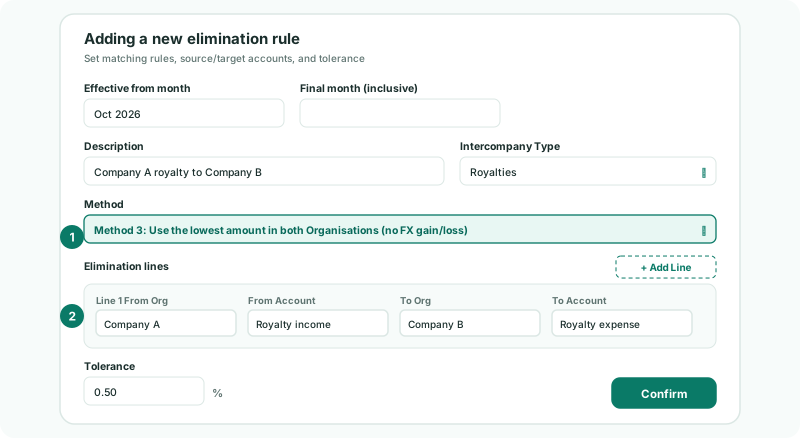
A Method 3 rule can hold several lines, each with its own pair of companies and accounts. That is covered in Build rules with several legs. The Tolerance field is shown, but has no effect on Method 3.
3See what the rule posts
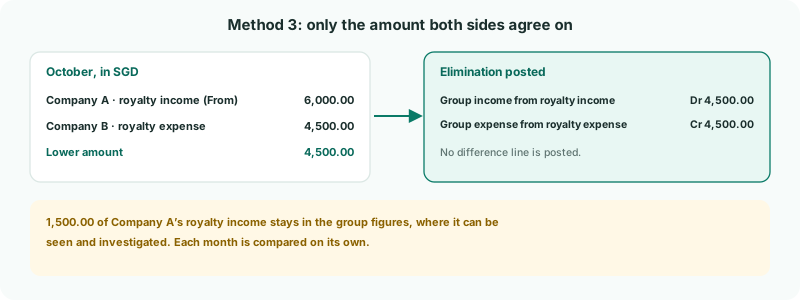
Each month, the rule clears the lower of the two translated amounts from both group accounts. In the example, 1,500.00 of Company A’s royalty income stays in the group’s income. Nothing is held back for review either: the gap simply shows.
Each month is compared on its own. If Company B books the missing 1,500.00 in November, November’s rule compares November’s amounts only, so the 1,500.00 shows again — this time as extra expense in November. Over the two months the leftovers cancel out in profit, but the group’s royalty income and expense both stay 1,500.00 too high. Clear that pair with an elimination entered by hand, as in the Eliminate by hand track.
Exchange differences behave the same way. Because nothing is posted to FX, the side with the higher translated amount keeps the small difference.
Check
In the October Profit & Loss with Show Entities on, the group column shows the royalty income and expense reduced by the same amount, the lower of the two. Any amount left is the part one company has booked and the other has not.
4Follow up what is left
Method 3 never tells you about the gap: it leaves it in the figures. Make looking for it part of the month-end review.
- Each month, open the group Profit & Loss with Show Entities on and look at the lines a Method 3 rule clears.
- Anything left on them is one company’s booking without the other’s in that month. If the other company booked it to a different account, correct its books and reload it. If it will book it in a later month, plan the elimination by hand for when it does.
If you would rather be told about every gap, use Method 2 with Timing and Review before posting, or Method 4.
5If something goes wrong
| Leg 1 is incomplete. | A company or account on the line is empty. Fill it in. |
| Leg 1: From and To Organisation cannot be the same. | Both sides of the line are the same company. Choose the other company on one side. |
| A month is not eliminated | One of the two sides has nothing that month, so the lower amount is zero. Or the month is outside the rule’s effective period. |
| A small amount stays every month | The two sides translate to slightly different group amounts. That is how Method 3 works; use Method 2 with FX to clear it. |
Want more detail? See the documentation