
Intercompany Eliminations · Track 6 · Tutorial 4 of 5
Lock the month
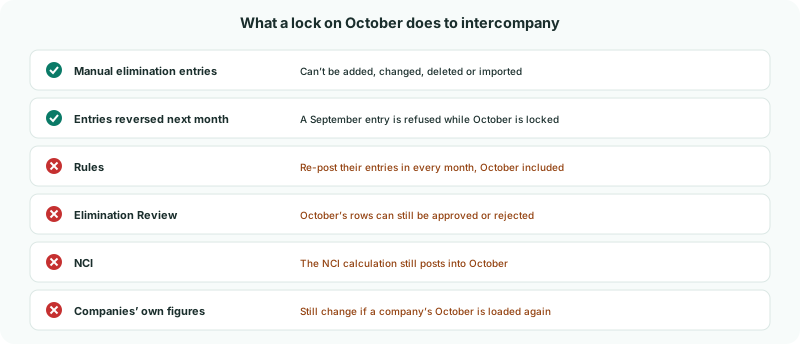
Once October is reviewed and reported, lock it. Manual changes to its eliminations are then refused. Rules, Elimination Review, the NCI and the companies’ own figures still run in a locked month.
1Know what the lock freezes
| In a locked month | What happens |
|---|---|
| Manual elimination entries | Adding, editing, deleting or importing one dated in October is refused. |
| Rules | Editing, adding or deleting a rule re-posts its entries in every month, October included, so each entry still matches its rule. |
| Elimination Review | October’s rows can still be approved or rejected, so entries re-posted by rules can be reviewed. Moving an edited entry to a different month needs that month open. |
| Entries reversed the next month | Trade balances from documents and unrealised profit are reversed on the 1st of the next month. While October is locked, a September entry of either kind can’t be added or changed, because its reversal would land in October. |
| The NCI | The NCI calculation still posts into October, as it does in open months. |
The lock is for the whole group and the month: every company, every intercompany type.
2Know what it doesn’t freeze
A lock doesn’t stop a company’s October being loaded again: the nightly sync and file uploads still update its trial balance. Rules re-post October to match, but a manual elimination entry doesn’t change, so a company that changes its October books after the lock can leave the group out of balance on that intercompany item until you reopen the month.
Close October in the companies’ own systems first. Lock the month in each company’s accounting system, then lock it in BrizoConsol.
3Lock October
- Check nothing for October is waiting in Intercompany → Elimination Review.
- Open Review → Month End Status, and choose Oct 2026.
- Click Lock. The padlock turns red and the button changes to Unlock.
Only Administrators see the Lock and Unlock buttons. Every lock is recorded in the System Audit Trail as period.locked, with who and when.
4See the lock at work
- Open Intercompany → Intercompany Loans, choose Oct-2026, and try to edit LOAN-A-C-2026-10.
Saving is refused with Period Oct 2026 is locked. Contact administrator. The same message appears for any manual change to a locked month’s eliminations.
Check
On Month End Status, October shows a red padlock and an Unlock button.
5Reopen the month for a correction
Company B finds an October invoice to Company A it booked twice, and corrects its books.
- On Month End Status, click Unlock for October. It is recorded as period.unlocked.
- Load Company B’s October again. Its rules re-post October with the corrected figures.
- Clear anything new in Elimination Review, and check the month on Month End Status.
- Click Lock again.
Unlock, correct and lock in one sitting, so no other change slips into the month while it is open.
6If something goes wrong
| Period Oct 2026 is locked. Contact administrator. | The entry, or its reversal on the 1st of the next month, is in a locked month. Ask an Administrator to unlock it. |
|---|---|
| There is no Lock button | Only Administrators can lock and unlock. |
| An intercompany item is out of balance in a locked month | A company’s figures for the month were loaded again after the lock. Reopen the month as in step 5. |
| October’s eliminations changed after the lock | That is expected: rules and the NCI post into locked months, and a company’s October can still be loaded again. |
Want more detail? See the documentation