
Intercompany Eliminations · Track 1 · Tutorial 5 of 5
Check your chart with COA Suitability
COA Suitability reads every company’s chart of accounts and tells you whether your intercompany accounts can be paired reliably enough for rules that run every month. Run it once your accounts are named and loaded, and again whenever you rename them.
1Know what the check does
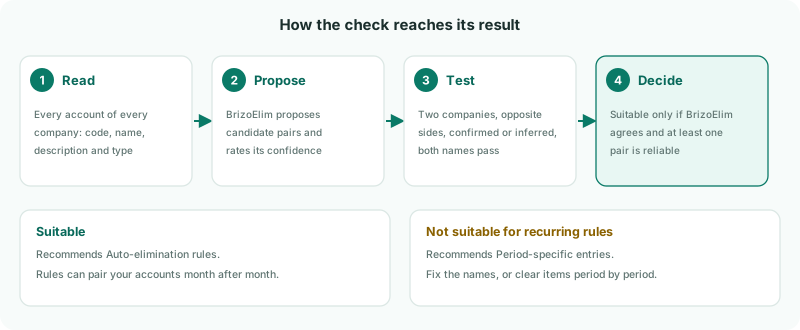
| 1 · Read | Every account of every company in the group: its code, name, description and type. |
|---|---|
| 2 · Propose | BrizoElim proposes the account pairs that look intercompany, and rates how sure it is of each. |
| 3 · Test | BrizoConsol keeps a pair as reliable only if the accounts belong to two different companies, sit on opposite sides (asset and liability, or revenue and expense), are rated confirmed or inferred, and pass the naming tests — both say intercompany, and each points to the other company by name or by mirrored codes. |
| 4 · Decide | The chart is Suitable only if BrizoElim judges it suitable and at least one pair is reliable. Otherwise it is Not suitable for recurring rules. |
The check reads the accounts themselves, not how they are mapped, so mapping does not change its result. It changes nothing in your data: it only rates the chart and saves the result for the group.
2Run the check
- Select Your Group, and open Settings → Organisation Settings → Organisation Details.
- In Formatting & Standards, find COA Suitability.
- Click Recheck. It shows Checking... while BrizoElim reads the accounts, which can take a little while for a large group.
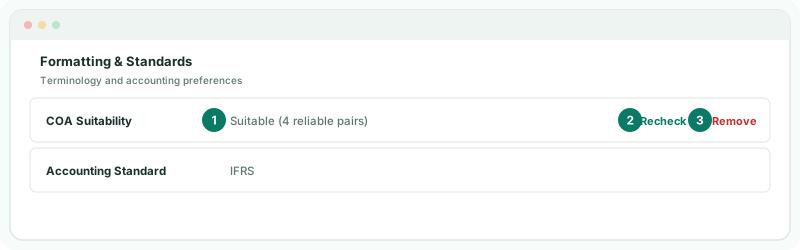
Recheck always runs a fresh check, even if nothing has changed since the last one.
3Read the result
| COA Suitability shows | It means | BrizoElim recommends |
|---|---|---|
| Suitable (N reliable pairs) | N account pairs passed every test. Rules on those pairs can run every month. | Auto-elimination rules |
| Not suitable for recurring rules | No pair passed every test, or BrizoElim judged the chart unsuitable overall. | Period-specific entries |
| Not assessed | No check has been run for the group, or the result was removed. | — |
For Your Group, with the management fee and royalty accounts renamed, the check finds the fees due, the loan, the management fee and the royalty pairs. The exact count depends on what BrizoElim proposes, so read it as a guide, not a target: what matters is that every pair in your plan that should be cleared by a rule is among them.
The recommendation is put forward when you first set up BrizoElim, in Set up BrizoElim. That dialog also shows the full result: how many accounts and companies were read, how many candidate pairs were found and how many were confirmed as reliable, BrizoElim’s reason, and the naming patterns it saw. Setting it up is covered in Set up BrizoElim and choose how it works.
4If the chart is not suitable
Work through the pairs in your plan that should be cleared by a rule, against the tests in step 1:
| Look for | Fix |
|---|---|
| A generic name such as “Intercompany receivable” | It says intercompany but not with whom. Add the other company’s name to the account’s code, name or description, or give the pair mirrored codes. |
| A name with the company but no intercompany wording, such as “Company B fees” | Add Due from, Due to, Intercompany or another of the words in Name and map intercompany accounts. |
| One side named, the other not | Both sides must point to each other. Rename the other company’s account too. |
| Two accounts on the same side, such as two receivables | Check the account type in each company’s books. |
- Rename or correct the accounts in the companies’ accounting systems.
- Reload those companies in BrizoConsol.
- Click Recheck.
A result of Not suitable does not stop you working: you can still write rules for the pairs you know, or clear items period by period. It tells you BrizoElim can’t rely on your names to pair accounts for you.
5Keep the result up to date
The result is saved, and the row keeps showing it until a new check runs. After you rename, add or retype intercompany accounts, click Recheck so the row reflects the chart as it is now.
To clear the saved result, click Remove, then Remove Result in Remove COA Suitability Result. The row returns to Not assessed. The BrizoElim method you chose is not changed.
Check
COA Suitability shows Suitable, and the number of reliable pairs is at least the number of rows in your plan cleared by a rule — three for Your Group.
6If something goes wrong
| The COA suitability check did not return a valid result. | BrizoElim did not answer in a form BrizoConsol could use. Click Recheck again. |
| The COA suitability check could not be completed. | The check stopped before it finished. Click Recheck again. |
| The result did not change after renaming | The companies have not been reloaded, so BrizoConsol still has the old names. Reload them and recheck. |
| Fewer reliable pairs than expected | A pair failed one of the tests. Check the pair against step 4, especially that both sides point to the other company. Mirrored codes must match exactly: each code’s first part is the other’s last part. |
| Recheck is not on the page | COA Suitability is on the group’s Organisation Details. Make sure Your Group, not one of its companies, is selected. |
Want more detail? See the documentation