
Foreign Currency · Track 2 · Tutorial 2 of 4
Map CTA posting accounts
The CTA on a foreign company’s capital, reserves and retained earnings is posted against the group equity account each one belongs to. Most are matched for you. The rest are listed until you map them, and their CTA isn’t posted until you do.
1Know how accounts are matched
For each equity account of a company in another currency, BrizoConsol looks for the group account in this order:
| 1. A mapping you saved | On this page, as below. |
|---|---|
| 2. The same code | A group account with the same code: Company B’s 3000 Share Capital matches the group’s 3000. |
| 3. The same name | A group account with the same name, whatever its code. |
An account with none of these is listed under Equity accounts to map for its company. This is separate from Account Mapping: an account mapped there for the reports still needs a match here.
2Map the listed accounts
- Select Your Group, and open Adjustments → Currency translation → Settings.
- Under Companies, click a company with an amber dot, such as Company B. Under Equity accounts to map, read each row: the company’s account and its Kind.
- In Group account, choose the group equity account it belongs to, and click Save mapping. Then do the same for Company C.
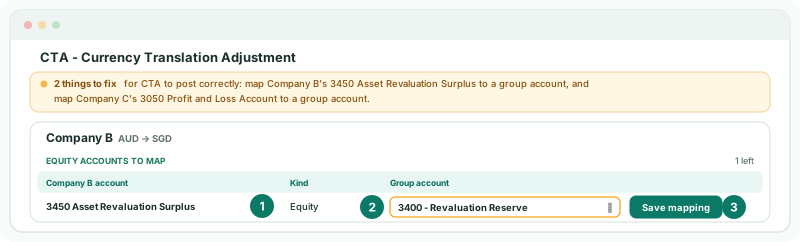
For Your Group:
| Account | Kind | Group account |
|---|---|---|
| Company B, 3450 Asset Revaluation Surplus | Equity | 3400 Revaluation Reserve |
| Company C, 3050 Profit and Loss Account | Retained earnings (2024, 2025) | 3200 Retained Earnings |
A Retained earnings row lists in brackets the years whose retained earnings are waiting for it. Each mapping is saved on its own, and the CTA is posted again as soon as it is.
3Check the CTA is complete
- Reload Settings. The note at the top no longer names an account to map, and each mapped account shows its group account under Equity accounts to map.
- Open Adjustments → Currency translation → CTA / FCTR for Oct-2026, and click Company B’s Auto CTA Journal row: its lines now include the mapped accounts.
Check
On the group’s Balance Sheet for October, NET ASSET equals EQUITY, and every Auto CTA Journal row’s Diff is 0.00.
4If something goes wrong
| Selected account must be in the equity section. | Choose a group account in the equity section of the Common COA. |
|---|---|
| … to fix for CTA to post correctly: choose the CTA reserve account | No reserve account is chosen. Click the CTA reserve account icon beside Companies and choose it, as in Handle foreign currency companies. |
| A new account appears in the list later | The company added an equity account with a code and name the group doesn’t have. Map it the same way. |
Want more detail? See the documentation