
Foreign Currency · Track 2 · Tutorial 3 of 4
Reconcile the CTA
The CTA reserve moves every month, and at the year end someone will ask why. Every part of the movement has a source you can open: each foreign company’s CTA, the NCI’s share of it, goodwill retranslation, and any manual CTA journal.
1Know what makes up the reserve’s movement
| Each foreign company’s CTA | Posted automatically for every company in another currency. The CTA Report shows it by component. |
|---|---|
| The NCI’s share | For a company the group doesn’t own in full, the NCI’s percentage moves out of the reserve to the NCI share of CTA account. See Translate goodwill and the NCI’s share of the CTA. |
| Goodwill retranslation | Goodwill on a foreign company, retranslated at each closing rate. |
| Manual CTA journals | Anything your team posted by hand. |
2Read each company’s CTA
- Select Your Group, and open Adjustments → Currency translation → CTA Report.
- Choose Actual, YTD and Oct-2026, and click Company B’s row under CTA by company.
- Note its This year, then do the same for Company C.
Rates used lists the rates used. Where this year’s … came from splits the total into four components, line by line with each formula, and Posting accounts shows the component and the account each line was posted to:
| Component | What it measures |
|---|---|
| Non-P&L Equity Translation | Share capital and other reserves at the closing rate instead of their historical rate. |
| P&L-Related Equity Translation | The year’s movements in equity, at the closing rate instead of the average. |
| Current Year Earnings CTA | The year’s profit translated month by month at average rates, against the same profit at the closing rate. |
| Retained Earnings CTA | Retained earnings at the closing rate against their historical translation, carried from year to year. |
Switch Basis to MTD to see one month on its own — the quickest way to find the month a large movement happened.
3Check the CTA journals
- Open Adjustments → Currency translation → CTA / FCTR, and choose Actual and Oct-2026.
- Under Auto CTA Journals, check every row’s Diff is 0.00, and click a row to see its lines.
- Under Manual CTA Journals, check each journal is one your team meant to post.
The auto journals are reposted every time the group is recalculated and whenever a CTA setting is saved, so they always follow the latest rates and figures. Deleting one only lasts until the next recalculation.
Post a manual CTA journal only for something the automatic CTA can’t know about. Click Add Manual CTA Journal, choose the related subsidiary — it is required — and enter balanced lines. A manual CTA journal can’t recur.
4Find the NCI and goodwill entries
- Open Review → Elim. & Journals Report for each month of the year.
- Search for NCI-AUTO-CTA to list the NCI’s share of each company’s CTA, and NCI-AUTO-GWFX for goodwill retranslation.
- Add up the lines on the CTA reserve account.
5Build up the movement
- Open the group’s Balance Sheet, and note 3500 CTA Reserve at the end of last year and at Oct-2026.
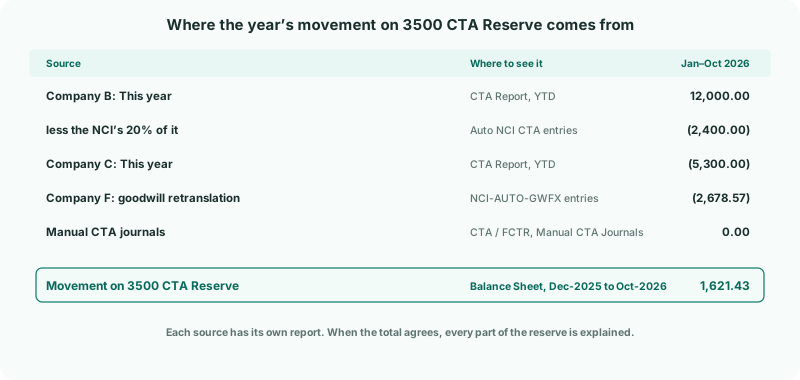
- Add up the sources: each company’s This year on the CTA Report, less the NCI’s share, plus goodwill retranslation and manual journals.
Check
The sources add up to the reserve’s movement. For Your Group from January to October: 12,000.00 − 2,400.00 − 5,300.00 − 2,678.57 + 0.00 = 1,621.43, the movement on 3500 CTA Reserve.
Keep the build-up with the year-end file. Auditors ask for exactly this.
6If something goes wrong
| The sources don’t add up to the movement | Something else was posted to the reserve — an ordinary journal, or an elimination using it. Drill into the reserve on the Balance Sheet to find it. |
| A company isn’t in the CTA Report’s CTA by company table | Only a company whose currency differs from the group’s has a CTA. If it does differ, check the CTA settings for anything left to fix. |
| One month’s CTA is much larger than the others | Look at that month in MTD. A rate entered wrongly, or a historical rate that changed, is the usual cause. |
| A Diff isn’t 0.00 | The journal is out of balance. Save a CTA setting to repost, and check the posting accounts are mapped. |
| The CTA Report or CTA / FCTR shows an upgrade message | They aren’t included in the Standard edition. |
Want more detail? See the documentation