
Controls and Audit · Track 2 · Tutorial 1 of 4
Track the close with Month End Status
A close has many hands: every company’s books, then eliminations, journals, NCI and CTA. Month End Status shows on one page what is in and what is still missing for the month.
1Open the month
- Select Your Group, and open Review → Month End Status.
- Choose Oct 2026 under Period, or step with the arrows. Current marks the group’s reporting month, which the page opens on.
The padlock beside the period is green while the month is open and red once it is locked.
2Read the summary
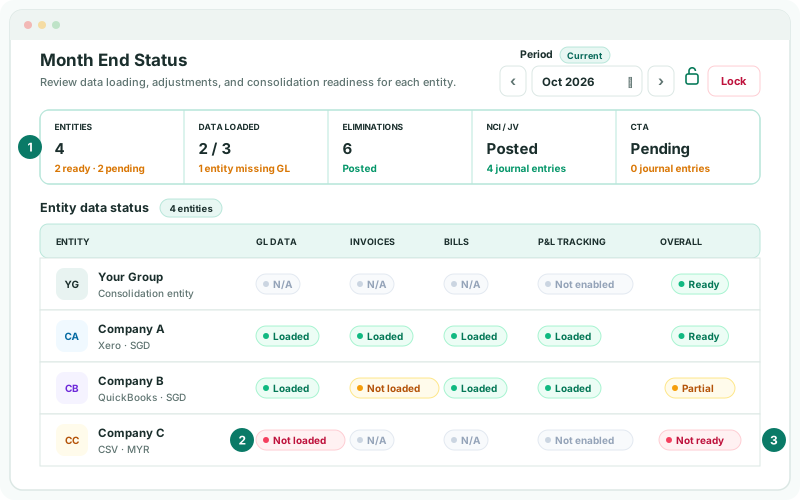
| Entities | How many entities there are, how many are ready and how many pending. |
|---|---|
| Data loaded | How many companies have the month’s general ledger, such as 2 / 3 with 1 entity missing GL. |
| Eliminations | The number of elimination entries for the month: Posted once there are any, otherwise Pending. |
| NCI / JV | Posted or Pending, with the number of journal entries. |
| CTA | Posted or Pending, with the number of journal entries. |
3Get every company loaded
Under Entity data status, each company shows GL data, Invoices, Bills and P&L tracking, and an Overall status.
| Ready | Everything that applies to the company is loaded. |
|---|---|
| Partial | The general ledger is in, but invoices, bills or tracking are not. |
| Not ready | The month’s general ledger is missing. |
- Click a Not loaded pill. It opens that company’s Data Loading page.
- Load the month there, and come back to Month End Status.
N/A means the data type doesn’t apply, such as the group itself. Not enabled means the company’s connection doesn’t offer P&L tracking.
4Check the group adjustments
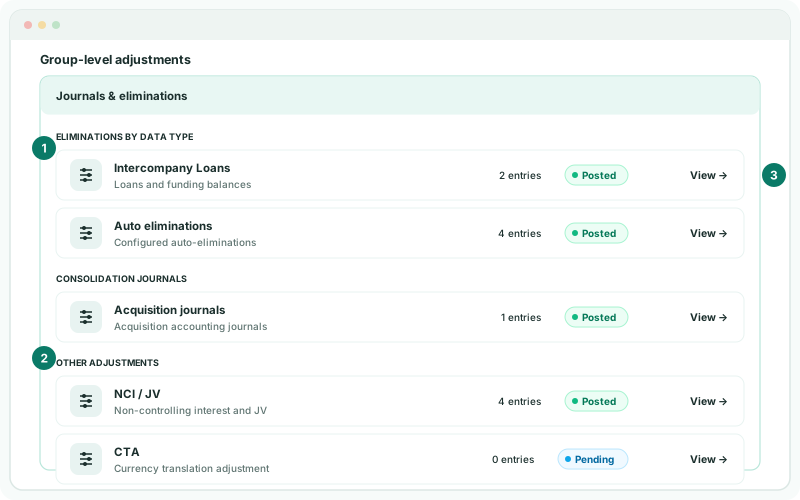
Under Group-level adjustments, Eliminations by data type lists each kind of elimination with entries this month, such as Intercompany Loans or Auto eliminations; Consolidation Journals lists each kind of journal; then NCI / JV and CTA.
- Click View on a row to open its entries for the month.
- Where a kind you expect isn’t listed, or NCI / JV or CTA is Pending, post it before going on.
A count says an entry exists, not that it is right. Review the entries themselves in the Elim. & Journals Report.
5Close the month
- With every company Ready and the adjustments posted, review the month’s comments and entries.
- Lock the month, as in Lock closed periods.
Check
Month End Status for Oct 2026 shows Data loaded 3 / 3 with All GL loaded, every company Ready, Eliminations, NCI / JV and CTA Posted, and a red padlock.
6If something goes wrong
| What you see | What to do |
|---|---|
| Month End Status isn’t in the Review menu | It needs Administrator or Journals & Eliminations Admin access. |
| A company stays Not ready after loading | The load didn’t include the general ledger for that month. Load the month again with GL ticked. |
| A kind of elimination you expect isn’t listed | Check the rule in Elimination Rules, and anything waiting in Elimination Review. |
Want more detail? See the documentation