
Controls and Audit · Track 2 · Tutorial 2 of 4
Lock closed periods
Once a month is reported, it should not change by accident. A lock refuses manual changes to the month for the whole group, while the system calculations keep its group entries in step with their rules.
1Know what the lock does
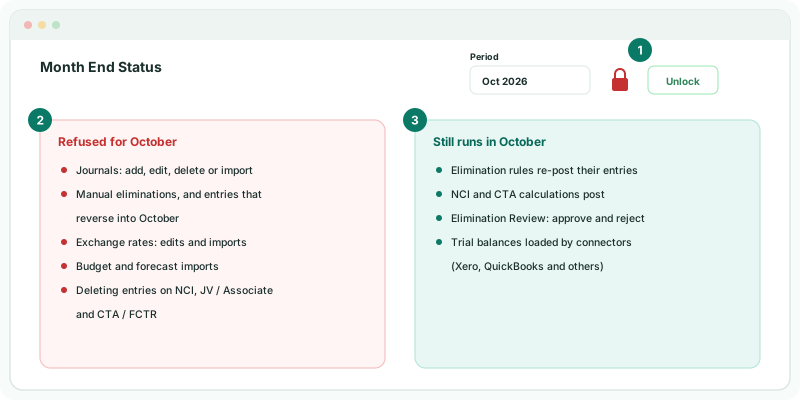
| Refused in a locked month | What happens |
|---|---|
| Journals | Adding, editing, deleting or importing a journal dated in October is refused, including journals posted from the NCI, JV / Associate and CTA / FCTR pages. A recurring journal is refused if any of its months is locked. |
| Manual eliminations | Adding, editing, deleting or importing one dated in October is refused. So is a September entry that reverses on 1 October. |
| Exchange rates | October’s rates can’t be changed: the grid skips locked months, and an import with a locked month is refused. |
| Budget and forecast imports | A file with a locked month is refused whole. |
| NCI, JV / Associate and CTA / FCTR pages | The delete button on an October entry is greyed out, with Period locked. |
| Still runs in a locked month | What happens |
|---|---|
| Elimination rules | Adding, changing or deleting a rule re-posts its entries in every month, October included, so each entry still matches its rule. |
| NCI and CTA | The calculations post into October as they do in open months. |
| Elimination Review | October’s rows can still be approved or rejected, so entries re-posted by rules can be reviewed. Moving an edited entry to a different month needs that month open. |
| Trial balances from connectors | Xero, QuickBooks and the other connectors still load October. Lock the month in each company’s accounting system too, or, on Premium, control when each company refreshes, as in Control when connected companies refresh. |
The lock covers the whole group and the month: every company, every scenario.
2Lock October
- Open Review → Month End Status, and choose Oct 2026.
- Click Lock.
The padlock turns red and the button changes to Unlock. Only Administrators see the button. The lock is recorded in the System Audit Trail as period.locked, with who and when.
3See it at work
- Open Adjustments → Journals → Consolidation Journals, click Add a new journal entry, and date the journal in October.
The dialog shows One or more selected periods are locked. Change the date range or ask an administrator to unlock them. Saving is refused with Period Oct 2026 is locked. Contact administrator.
Check
Month End Status shows Oct 2026 with a red padlock and an Unlock button, and the System Audit Trail lists period.locked for Oct-2026 with your name.
4Reopen the month for a correction
- On Month End Status, click Unlock for Oct 2026. It is recorded as period.unlocked.
- Post the correction.
- Check the month again on Month End Status, and click Lock.
Unlock, correct and lock in one sitting, so nothing else slips into the month while it is open.
5If something goes wrong
| What you see | What to do |
|---|---|
| Period Oct 2026 is locked. Contact administrator. | The entry, or the month it reverses into, is locked. Ask an Administrator to unlock it. |
| Periods Sep 2026, Oct 2026 are locked. Contact administrator. | An import file covers locked months. Remove those months from the file, or unlock them. |
| There is no Lock button | Only Administrators can lock and unlock. |
| October’s figures changed after the lock | A company’s October was loaded again from its accounting system, or a rule, NCI or CTA calculation re-posted. Check the System Audit Trail for the month. |
Want more detail? See the documentation