
Cell Reports · Track 1 · Tutorial 6 of 12
Bring NCI, CTA, associates and eliminations into cells
Available on ProPremium
The statements show what the consolidation adds up to. A board or an auditor also asks about the pieces: what share of Company B the minorities hold, how much translation went to reserves this year, what the associates earned, how many eliminations the month needed. Each of those can be a live cell.
1Know the sources
| Cell type and source | Reads |
|---|---|
| Financial data · NCI calculation | The live NCI calculation: its Calculation lines, the Ownership assumptions of each subsidiary, and a Report summary. |
| Financial data · CTA report | The posted currency translation lines, the Entities they belong to, and a Report summary with the total. |
| Financial data · JV / Associate report | The share of each associate’s profit, the ownership of each associate, and a Report summary with the total share of profit. |
| Consolidation data | The month’s posted CTA, NCI, eliminations or journals, as a total or a count. |
These sources have no Entity field: they read the organisation the report belongs to. Build them in a report of Your Group, the organisation that consolidates.
2Add the sheet
- Open the monthly summary in the editor, and click + (Add sheet) beside the sheet tabs. Name the new sheet Group.
- In A1 type Group adjustments. In A3 to A8 type Company B NCI %, Company B goodwill, CTA for the year, Share of associates’ profit, Eliminations this month and Journals this month.
Each figure below keeps Reporting month on Reporting month, so next month it reads next month. A sheet’s Cell references read its own sheet only; to follow the month chosen on the Summary, copy it into this sheet first, as in Separate parameters, data and presentation across sheets.
3Read a subsidiary’s NCI
- Click B3. Set Cell type to Financial data and Data source to NCI calculation.
- Keep Version on Actual and Period basis on Year to date. In Subsidiary, choose Company B.
- Set Result set to Ownership assumptions and Value to NCI percentage.
- In the toolbar, set the Number format to Percentage.
- Click B4 and set it up the same way, with Value Goodwill or gain.
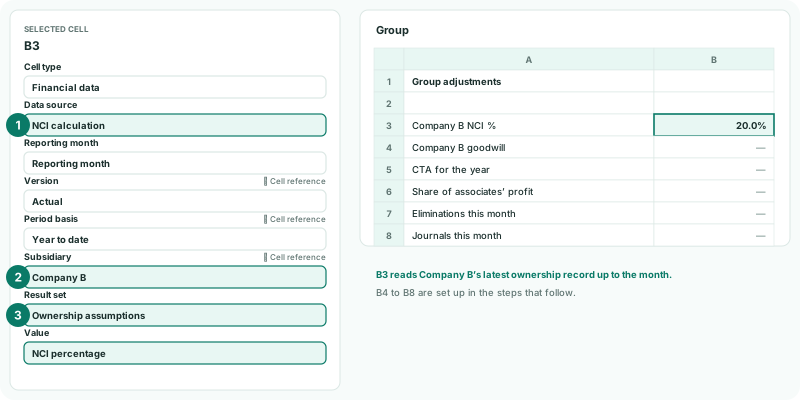
The ownership assumptions are Company B’s latest ownership record up to the month: the NCI percentage, the parent’s percentage, the investment cost, the net assets at the date and the goodwill or gain. The NCI percentage arrives as a fraction, such as 0.2, which is why the cell is formatted as a percentage.
Calculation lines adds every line of the calculation together, whatever its component, so it suits Line count on the Report summary better than an amount. For one subsidiary’s NCI in the statements, read the statement lines instead, as in Bind cells to financial data.
4Read the translation adjustment
- Click B5. Choose Financial data and CTA report.
- Keep Version on Actual and Period basis on Year to date. Keep Accounting basis on Base, or choose the standard you report under.
- Keep Entity on All applicable entities. Set Result set to Report summary and Value to Total CTA.
Choose one company in Entity for its CTA alone. The Entities result set gives each company’s name, Functional currency and Presentation currency, for a heading beside the figure.
5Read the associates
- Click B6. Choose Financial data and JV / Associate report.
- Keep Version on Actual, Period basis on Year to date, and JV / Associate on All associates.
- Set Result set to Report summary and Value to Total share of profit.
Choose one company in JV / Associate for its share alone. Ownership assumptions offers the same values as for a subsidiary, such as the Parent ownership percentage.
6Count the eliminations and journals
- Click B7. Set Cell type to Consolidation data, and Data source to Intercompany eliminations.
- Keep Reporting month on Reporting month and Scenario on Actual. Set Value to Number of entries.
- Click B8 and set it up the same way, with Consolidation journals.
- Click Save.
| Data source | Counts |
|---|---|
| Intercompany eliminations | Every elimination, of every type, and the auto eliminations. |
| Consolidation journals | Every journal: consolidation journals, GAAP journals, and the journals posted from the NCI, JV / Associate and CTA pages. |
| Non-controlling interest | The NCI and NCI P&L entries BrizoConsol posts, NCI journals and Dividend NCI journals. |
| Currency translation adjustment | The posted CTA, as on the CTA report. Here Total amount is the CTA itself, and a Period basis is offered. |
For eliminations, NCI and journals, Total amount adds each entry’s size: the larger of its debit and credit sides. Number of entries counts them.
7Check it
- Click View and open the Group sheet for Oct-2026.
- Compare B3 and B4 with Company B on Ownership & Equity → Ownership, B5 with Adjustments → Currency translation → CTA Report for Actual, YTD and Oct-2026, and B6 with Ownership & Equity → JV / Associate Report for the same.
- Open Review → Elim. & Journals Report for Actual and Oct-2026, By month.
Check
B3 shows Company B’s NCI percentage as the Ownership page does, B5 and B6 match the two reports, and B7 and B8 match the number of entries the Elim. & Journals Report lists with the elimination chips, and with the Journal and GAAP Journal chips.
8If something goes wrong
| What you see | What to do |
|---|---|
| NCI calculation, CTA report or JV / Associate report shows an error or nothing | The report belongs to a single company, not the group. Build these cells in a report of Your Group. |
| B3 shows 0.2 rather than 20% | Set the Number format to Percentage. |
| A figure is far larger than expected | The Result set is Calculation lines, which adds every line. Use Report summary or Ownership assumptions. |
| Total amount shows 0 for eliminations | No eliminations are posted for that month and scenario. Check the Elim. & Journals Report. |
| The CTA differs from the CTA Report | Check the Period basis, the Accounting basis and the Entity match the report. |
Want more detail? See the documentation