
Cell Reports · Track 1 · Tutorial 3 of 12
Bind cells to financial data
Available on ProPremium
A Financial data cell doesn’t hold a number: it holds a question, such as “Revenue, actual, this month, for this entity”. BrizoConsol answers it each time the report is opened. Ask the question the right way and the cell stays right next month.
1Know the parts of the question
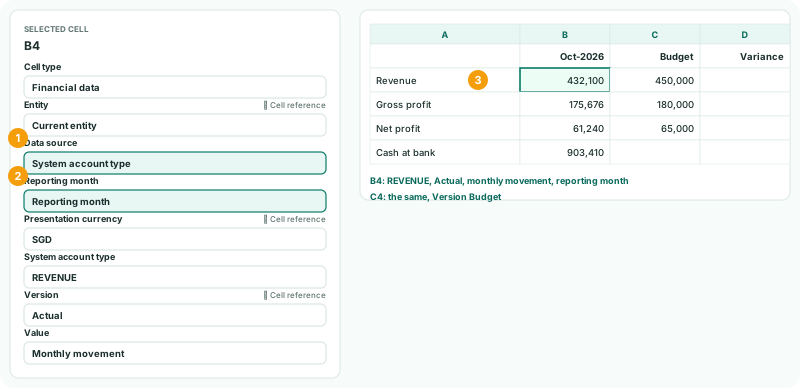
| Entity | Current entity is the entity the report is opened for. Choose a company only when the cell must always read that company. |
|---|---|
| Data source | What kind of figure: a section, a total, a tag, a KPI and so on. See step 2. |
| Reporting month | Reporting month is the month the report is opened for. Link to a cell reads the month from a cell. Fixed month always reads the same month. |
| Presentation currency | The currency the figure is shown in. It starts on the entity’s own currency. |
| Version | Actual, Budget or Forecast. |
| Value | Monthly movement for profit and loss, Closing balance for the balance sheet, or Previous month closing balance. |
Entity, Presentation currency and Version have a Cell reference box, and the month has Link to a cell. Use them, and the field reads its value from a cell instead — that is how a reader changes a report, in Let readers choose the entity, period and currency.
2Choose the data source
| Data source | Reads | Use it for |
|---|---|---|
| System account type | A statement section, such as REVENUE, DIRECT COSTS or BANK | Section totals, the same as on the statements |
| Financial statement total | NET PROFIT, GROSS PROFIT, CY EARNINGS or RETAINED EARNINGS | The statements’ own totals |
| Account type total | The total of one account type | A finer split than a section |
| Accounting standard tag | Every account carrying a tag from the Accounting Standard page | A line of a standard’s statements, such as Administrative Expenses |
| Accounts by type | The accounts of one type, as Movement, Closing balance, Debit or Credit | Debits or credits on their own |
| KPI | A KPI’s current month, year to date, target, variance to target or previous month | Ratios already defined as KPIs |
| Exchange rate | A rate between two currencies, average or closing, for a scenario | Showing the rates a report used |
| Profit & loss, Balance sheet, Trial balance (existing binding) | A section total or one account | Reports built before the sources above existed |
Prefer a source that reads a section, a total or a tag. It includes every account in it, so a new account is picked up without changing the report. A single account is right only when the line really is one account.
3Bind the month’s figures
- Click B4. In the inspector, set Cell type to Financial data.
- Keep Entity on Current entity. Choose Data source System account type, then REVENUE.
- Keep Reporting month on Reporting month, Presentation currency on SGD, Version on Actual, and Value on Monthly movement.
- Click C4 and set it up the same way, with Version Budget.
- For B5 and C5, choose Financial statement total, GROSS PROFIT; for B6 and C6, NET PROFIT.
Each cell shows its value as soon as it is set: B4 shows 432,100, October’s revenue.
4Bind a balance
- Click B8. Choose Financial data, System account type, BANK.
- Set Value to Closing balance.
- Click Save.
A balance sheet figure is a position at the month end, so it is always a closing balance. A movement on a balance sheet line — how much cash changed in the month — is a different question, and a different number.
Check
Open Reports → Profit & Loss and Balance Sheet for Your Group, Oct-2026. Revenue, Gross Profit and Net Profit match B4 to B6, the budget figures match the Budget scenario, and B8 matches the bank total.
5If something goes wrong
| A cell shows zero | The Value doesn’t suit the source: a Closing balance of revenue, or a Monthly movement of the bank. Or the Version has no figures for the month. |
|---|---|
| A cell shows last month’s figure next month | Its Reporting month is set to Fixed month. Choose Reporting month, or Link to a cell. |
| Every company sees the group’s figure | The Entity is set to Your Group. Use Current entity. |
| A new account isn’t in the figure | The cell reads one account. Read the section, a total or a tag instead. |
Want more detail? See the documentation