
Foundations · Track 3 · Tutorial 5 of 6
Buy a company abroad
Buying a company that keeps its books in another currency works like any acquisition, with one difference: from the purchase on, its figures and its goodwill move with the exchange rate. Set it up once, and BrizoConsol posts the translation every month.
1Understand what the currency changes
In the running example the group, which reports in SGD, buys 100% of Company F, a Malaysian company that keeps its books in MYR, in September 2026. It pays MYR 2,970,000 — SGD 900,000 at the rate of the day — and Company F’s net assets are worth SGD 750,000 at fair value. Goodwill is SGD 150,000.
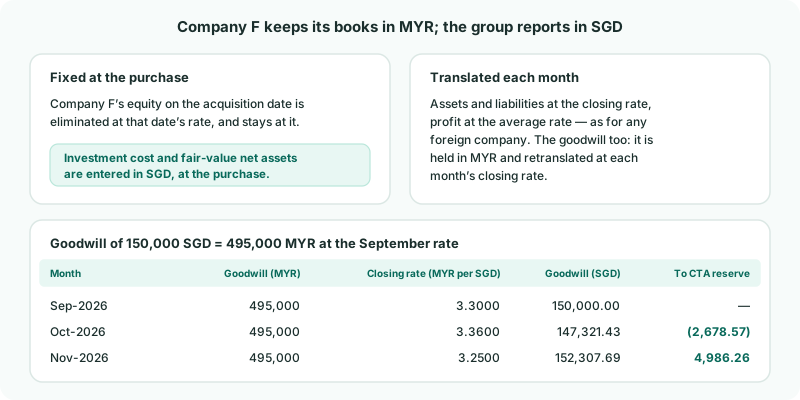
| At the purchase | The price and the fair value are entered in SGD. Company F’s equity on that date is eliminated against them at the acquisition-date rate, and that rate stays with it. |
|---|---|
| Every month after | Company F is translated like any foreign company — assets and liabilities at the closing rate, profit at the average rate — and the difference goes to the CTA reserve. |
| The goodwill | Goodwill belongs to the business bought, so it is held in MYR: 150,000 SGD at September’s closing rate of 3.30 is MYR 495,000. Each month it is retranslated at the new closing rate, and the change also goes to the CTA reserve. |
2Add the company and check its currency
- Add Company F to your hierarchy, bring in its figures and map its accounts, as in steps 2–4 of Buy a new subsidiary.
- Select Company F, open Settings → Organisation Settings → Organisation Details, and check its currency is MYR.
The currency decides everything that follows. If it shows the group’s currency, Company F is not translated and its goodwill is never retranslated.
3Check the exchange rates
- Select your group, and open Settings → Global Settings → Exchange Rates.
- For the Actual scenario, check that MYR has an Average Rate and a Closing Rate for September 2026 and every month after.
With Auto Exchange Rate - On, the Actual rates are fetched for you every night; if a month is missing for MYR, type the rate in. The goodwill needs a closing rate for every month from the purchase on — one missing month stops its retranslation.
4Switch on CTA for the company
- Open Adjustments → Currency translation → Settings.
- In Subsidiary entities, turn on CTA enabled for Company F.
- If CTA Posting Setup Required appears, use Map Required CTA Posting Accounts and click Save Mapping.
The CTA reserve account is the group’s, already chosen for your other foreign companies. Company F’s translation differences and its goodwill retranslation both go there.
5Record the acquisition in the group currency
- Open Ownership & Equity → Ownership, click Company F, and on the Ownership history tab click + Add record.
- Choose your group, Acquire, Sep-2026, 100 and Subsidiary.
- Enter the Investment cost (group currency) (900,000) and Net assets at date (fair value) (750,000) — both in SGD.
- Click Add Record.
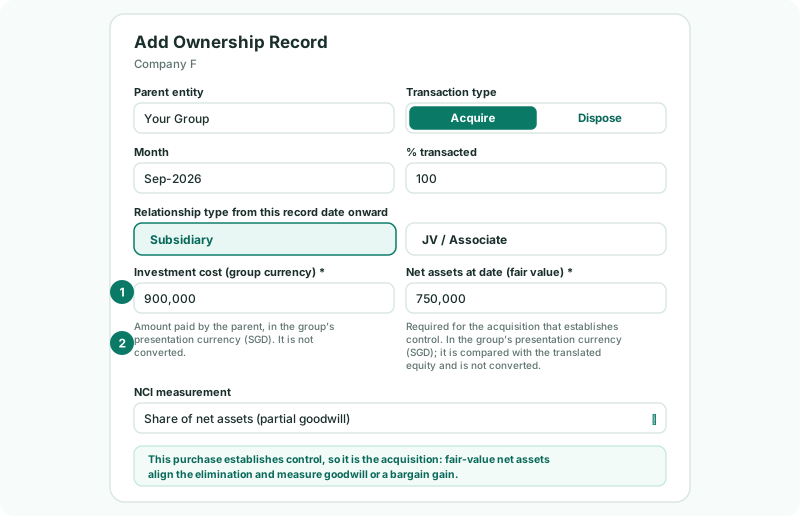
Neither amount is converted: the help text under each field names the group currency. Convert them yourself at the rate on the acquisition date — the rate the deal was settled at, or the closing rate for the day. BrizoConsol compares the fair value with Company F’s equity translated at the acquisition date, and posts any difference to the FV Adjustment account.
6Complete the acquisition details
- Open the Acquisition details tab for Company F.
- Choose the group accounts for Investment in subsidiary, Acquisition bank account and Goodwill, and click Save.
The Goodwill account matters more here than for a local company: it is the account the monthly retranslation is posted to. Without it, the goodwill stays at SGD 150,000.
Check
In Subsidiary entities, Company F shows Configuration of Ready, and Acquisition goodwill on the Acquisition details tab is 150,000.
7Check the historical rates
- Open Adjustments → Currency translation → Settings, and click Company F’s row.
- Under Equity historical rates, check its share capital and reserves are dated at the acquisition, with a System rate.
Because Company F has an ownership record, its equity is carried at the rate of the acquisition date — not the date its shares were first issued, which was under its previous owners. If the deal was settled at a different rate, type it into Historical rate; the source changes to Manual.
8Check the result
- Open Reports → Balance Sheet for Sep-2026: goodwill includes Company F’s 150,000, and NET ASSET equals EQUITY.
- Switch to Oct-2026: Company F’s part of goodwill is now 147,321.43 — MYR 495,000 at October’s closing rate — and the CTA reserve has moved by the 2,678.57 difference.
- Open Review → Elim. & Journals Report for Oct 2026, and search for NCI-AUTO-GWFX. Click the row to see its lines.
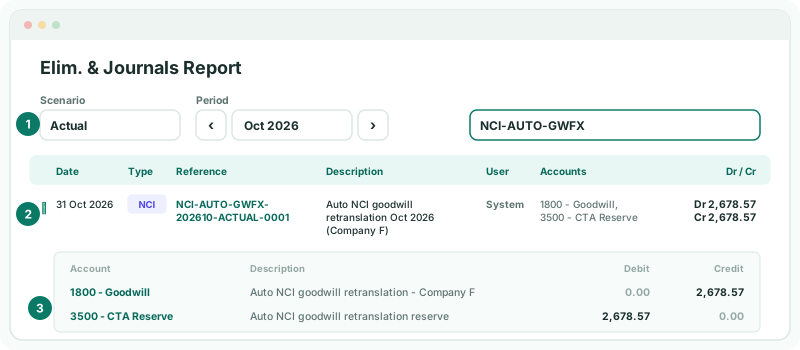
There is one entry a month, from the month after the purchase: September’s rate is the starting point, so it has nothing to retranslate. A month where the rate does not change posts nothing. A fall in the MYR, as here, reduces goodwill and the reserve; a rise, as in November, increases both.
9If something does not look right
| What you see | What to do |
|---|---|
| Missing closing exchange rate for the retranslation of goodwill… | Add the MYR closing rate for the month named in the message on Exchange Rates. |
| The goodwill stays at 150,000 every month | Check Company F’s currency is MYR, the Goodwill account is chosen on Acquisition details, and the group has a CTA reserve account. Goodwill you enter by journal yourself is not retranslated. |
| CTA is not configured. on the balance sheet | Turn on CTA enabled for Company F, as in step 4. |
| A large FV adjustment you did not expect | Check the Net assets at date (fair value) is in SGD, not MYR. Entered in MYR, it is more than three times too large. |
| Goodwill is not what you worked out | Check the Investment cost (group currency) is in SGD, and was converted at the acquisition-date rate. |
Want more detail? See the documentation