
SFRS Groups · Track 2 · Tutorial 3 of 3
Bring subsidiaries’ local-standard figures onto SFRS
Available on ProPremium
Your subsidiaries keep their books under the standards that apply to them. Where a local standard treats something differently from SFRS, you adjust for it at group level, with a journal on the group.
1Know where the adjustment goes
Company A keeps its books under a local standard that expenses its office lease as rent: 10,800 a month, and no lease on its balance sheet. Under SFRS(I) 16 and FRS 116, the group shows a right-of-use asset and a lease liability instead, with depreciation and interest in place of the rent.
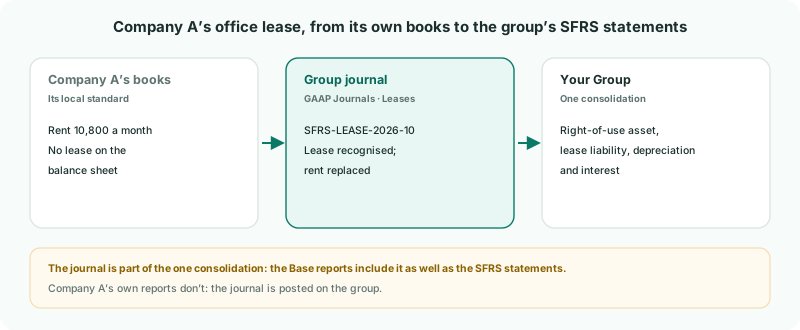
| Posted on the group | The journal is entered with Your Group selected, so Company A’s own figures and reports stay as its books are. |
|---|---|
| Part of the one consolidation | BrizoConsol has no SFRS-only entries. The journal is in the group’s Base reports as well as its SFRS statements. |
| Easy to find | A Journal ID that starts with the standard, such as SFRS-, and the matching Journal Type let you list every SFRS adjustment at once. |
Base doesn’t show the local-standard total once you adjust. After you post the journal, the group’s Base reports include it too. There is no view of the group without your SFRS adjustments.
2Recognise the lease
The lease starts on 1 October 2026, and the lease schedule puts the lease liability and the right-of-use asset at 360,000.
- Select Your Group, and open Adjustments → GAAP Journals. Keep the Scenario on Actual.
- Click Add a new journal entry.
- Enter the Journal ID SFRS-LEASE-2026-10-INIT, the date 1 October 2026, the Journal Type Leases, and the Description SFRS lease adjustment: Company A office lease, recognition.
- Debit 1650 Right-of-use Asset 360,000, credit 2700 Lease Liabilities 360,000, and click Confirm.
3Adjust each month
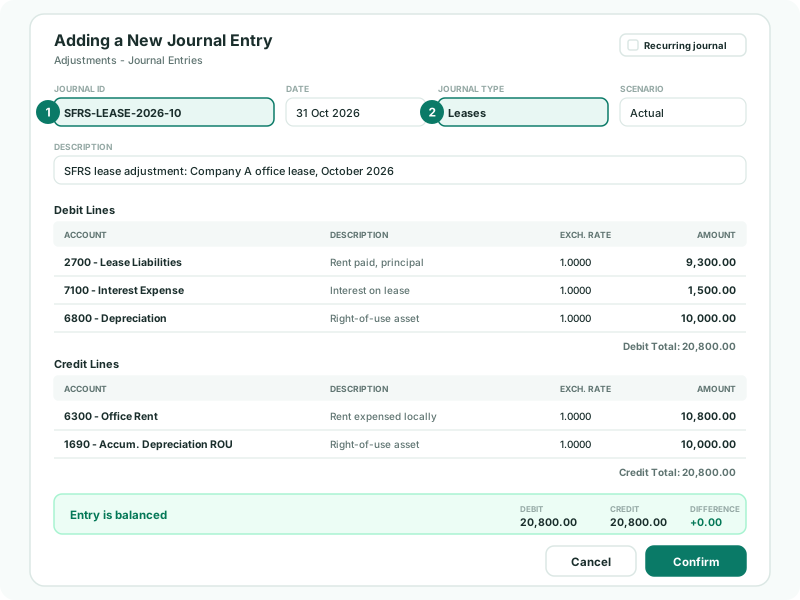
For October, the schedule gives interest of 1,500 and depreciation of 10,000. Of the 10,800 rent Company A paid, 1,500 is interest and 9,300 repays the liability.
- Click Add a new journal entry again.
- Enter SFRS-LEASE-2026-10, 31 October 2026, Leases, and the Description.
- Add the debit and credit lines below, check Entry is balanced, and click Confirm.
| Line | Why |
|---|---|
| Credit 6300 Office Rent 10,800 | Takes out the rent Company A expensed. |
| Debit 2700 Lease Liabilities 9,300 | The part of the payment that repays the liability. |
| Debit 7100 Interest Expense 1,500 | The interest on the liability. |
| Debit 6800 Depreciation 10,000, credit 1690 Accum. Depreciation ROU 10,000 | The month’s depreciation of the right-of-use asset. |
Repeat each month with that month’s figures from the schedule. The interest falls as the liability is repaid, so each month’s journal is different; Recurring journal suits an adjustment that is the same every month.
Company A’s books are in SGD, the group currency, so the exchange rate stays at 1.0000. For a subsidiary in another currency, set each line’s exchange rate.
4Check the adjustments
- On GAAP Journals, type SFRS- in the search box. Both lease journals are listed, and nothing else.
- Open Reports → All Reports → Consolidated Statement of Profit or Loss for 2026.
Check
For October, the group’s office rent is 10,800 lower, depreciation 10,000 higher and finance costs 1,500 higher. The lease liability is 350,700: 360,000 less 9,300.
On the cash flow, classify 2700 Lease Liabilities on Payment of Lease Liabilities, as in Classify profit or loss and cash flow lines. The line reads the whole movement on 2700, so for October it shows 350,700: the 360,000 recognition, which moved no cash, less the 9,300 repaid. From November it shows only the repayment.
5If something goes wrong
| GAAP Journals isn’t under Adjustments | No accounting standard is enabled for the group. Enable SFRS on the Accounting Standard page. |
|---|---|
| Journal ID already exists | Each Journal ID can be used once. Add the month, as in SFRS-LEASE-2026-10. |
| Duplicated account is not allowed in journal lines. | The same account is on two lines. Combine them into one. |
| The search finds journals that aren’t SFRS adjustments | The search covers every field, including descriptions. Keep the SFRS- prefix for SFRS adjustments only. |
| One or more selected periods are locked. | The month is locked in BrizoConsol. Ask an administrator to unlock it, or post the adjustment in an open month. |
Want more detail? See the documentation