
Row/Column Reports · Track 2 · Tutorial 1 of 6
Build column sets for months, quarters and years
A column set fixes which periods a report shows, in the order you want, and moves them with the reporting month. One set can give readers the recent months, the quarter and the year to date on a single page.
1Know the periods you can use
| Group | Periods |
|---|---|
| Monthly | Current Month, Last Month, Month -2 to Month -11, Same Month Last Year |
| Quarterly | Current Quarter, Last Quarter, Quarter -2, Quarter -3 |
| Yearly | Current YTD, Last Year YTD, YTD -2, Year End, Last Year End, Year End -2 |
| Fiscal | Fiscal Year, Budget Year, each with or without the full year, and Fiscal Month 1 to Fiscal Month 12 |
All of them are System Period columns: they count from the reporting month, so next month the same set shows next month. Fiscal Month 1 is the first month of the fiscal year, whatever the calendar month.
2Create the set
- Open Reports → Column Sets, and click Add Column Set.
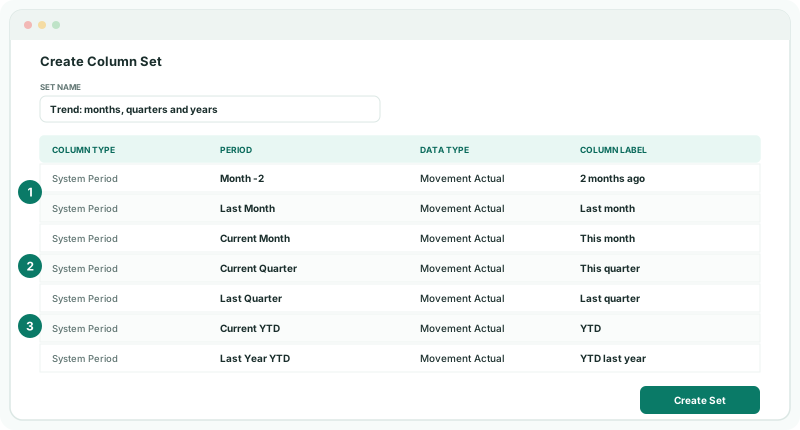
- Enter the Set Name Trend: months, quarters and years.
- Add three System Period columns, Month -2, Last Month and Current Month, each with the Data Type Movement Actual, labelled 2 months ago, Last month and This month. Click Add Column after each.
- Add Current Quarter and Last Quarter, labelled This quarter and Last quarter.
- Add Current YTD and Last Year YTD, labelled YTD and YTD last year.
- Check the order, using Move Up and Move Down if needed, and click Create Set.
Give the month columns labels that stay true as the months move on. A column left without a label is labelled with its period when you add it, such as Aug-2026.
For a balance sheet report, use Balance Actual instead, and Year End and Last Year End for the comparison.
3Use the set
- Open the Management P&L in the editor, open Period, and under Column Set choose Trend: months, quarters and years.
- Click Save, then View.
Check
With Oct-2026 as the reporting month, the report shows August, September and October 2026, then this quarter and last quarter, then the year to date beside the same period last year. Each month matches Reports → Profit & Loss for that month.
The same set can be chosen from the period selector on any report, including the built-in statements. See Set up column sets for periods and comparisons for budget and variance columns.
4If something goes wrong
| What you see | What to do |
|---|---|
| Create Set can’t be clicked | The set has no columns yet. Add at least one. |
| The columns are in the wrong order | Edit the set and use Move Up and Move Down. |
| Profit and loss columns look like running totals | The Data Type is Balance. Use Movement for profit and loss. |
| The set isn’t offered in the report | It was created for a different group. Column sets belong to the top organisation. |
Want more detail? See the documentation