
Read and Customise Reports · Track 2 · Tutorial 2 of 4
Customise the balance sheet
The built-in Balance Sheet lists each section, then total assets, total liabilities, net assets and equity. Override it to add the subtotals your readers look for, such as net current assets, and to choose which sections show every account.
1Know the built-in rows
| Row | What it is |
|---|---|
| BANK, ACCOUNTS RECEIVABLE, INVENTORY, Other Current Assets | Sections: each lists its accounts and a total. |
| Total Current Assets, Total Non Current Assets, ASSET | Formulas adding the sections above. |
| ACCOUNTS PAYABLE, PAYROLL PAYABLE, TAXES PAYABLE, CURRENT LIABILITY, NON CURRENT LIABILITY | The liability sections. |
| LIABILITY, NET ASSET | Total liabilities, and assets less liabilities. |
| EQUITY | The equity section. |
| Checking | A hidden formula, NET ASSET − EQUITY. It is zero when the balance sheet balances. |
The Balance Sheet shows balances at the end of each period, so its formulas work on closing balances too. Keep Checking when you change the rows: it is what tells you the statement still balances.
This changes the built-in Balance Sheet for everyone. To build your own report beside it from an empty one, follow Row/Column Reports.
2Add net current assets
- Open Reports → Balance Sheet, click Override Report, and choose Row/column report.
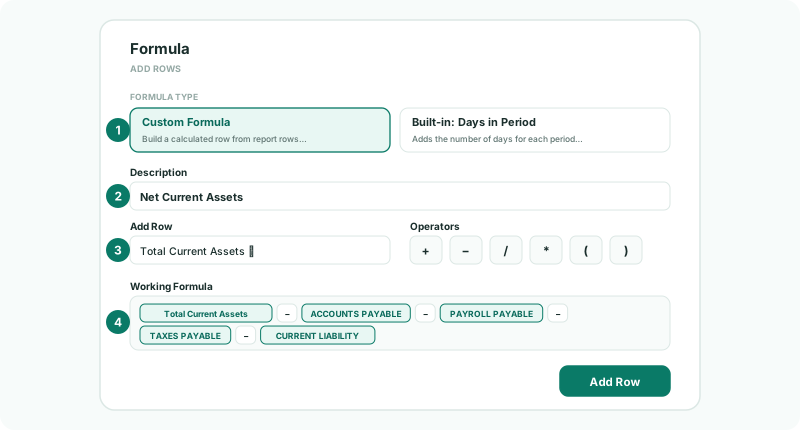
- Click the first blank row — click to configure — and choose Formula, then Custom Formula.
- In Description, type Net Current Assets.
- Build Total Current Assets − ACCOUNTS PAYABLE − PAYROLL PAYABLE − TAXES PAYABLE − CURRENT LIABILITY from Add Row and the operators.
- Under Text style, click B Header and B Data, click Add Row, and drag it to just under CURRENT LIABILITY.
3Choose detail or totals
- Click the BANK row’s label to edit it.
- Change Section display from Show detail to Total only, and click Update Row.
A section row shows either every account with its total, or the total alone. Use totals for a board pack and detail for the finance team’s own review. A section shown in detail can also show accounts with nothing in them: turn on Show empty under Display.
4Save and check
- Click Save, then View.
Check
Net Current Assets equals Total Current Assets less the four current liability sections, in every period column. NET ASSET still equals EQUITY, and both are the same as before the override.
To go back to the built-in Balance Sheet, open the override again and click Restore default.
5If something goes wrong
| NET ASSET and EQUITY no longer agree | A section was deleted, or taken out of a total’s formula. Every section must still be in Total Current Assets, Total Non Current Assets or LIABILITY. |
| A formula row is blank | A row it refers to was renamed or deleted. Rebuild the formula from the rows that are there now. |
| A section shows accounts you wanted as one line | Its Section display is Show detail. Edit it and choose Total only. |
Want more detail? See the documentation