
Row/Column Reports · Track 2 · Tutorial 4 of 6
Build a report with BrizoBuilder
BrizoBuilder turns a sentence into a report. Say what you want to see, for which companies and which month, and what to compare or highlight. It creates a cell-based draft you can check and change like any other Cell Report.
1Start a BrizoBuilder report
- Open Reports → Custom Reports and click Add a new report.
- In Choose report type, choose BrizoBuilder.
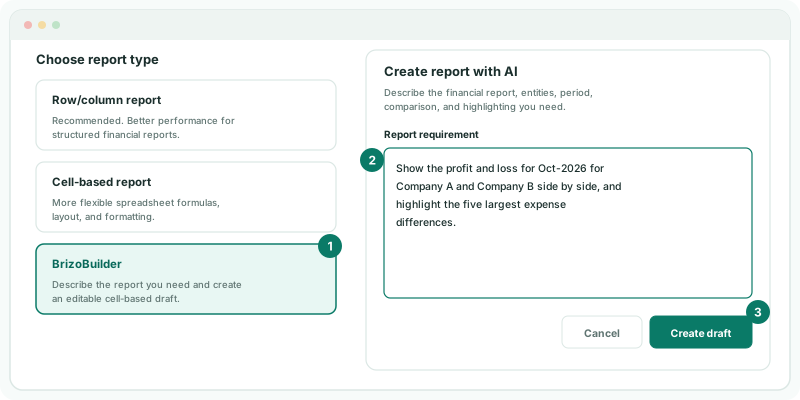
If BrizoBuilder is not in the list, your plan does not include it. If it reads Unavailable for this plan, your plan does not include Cell Reports, which BrizoBuilder drafts into.
2Describe the report
- In Report requirement, type: Show the profit and loss for Oct-2026 for Company A and Company B side by side, and highlight the five largest expense differences.
- Click Create draft.
Name the statement or figures, the companies, the month, and any comparison or highlighting, in up to 2,000 characters. Use the companies’ real names: BrizoBuilder matches them to your group. Creating the draft takes a moment while it reads the request and lays out the workbook.
3Answer a question if it asks one
- If the dialog opens again with a question under your requirement, add the answer to the requirement and click Create draft again.
BrizoBuilder asks rather than guesses. A request for Entity A and Entity B, for example, comes back with Which actual group entities should replace Entity A and Entity B?
4Check the draft
- The draft opens in the Cell Report editor. Read down the rows and across the columns before you rely on it.
Check
Each company has its own column, and the profit and loss lines match each company’s Profit & Loss for Oct-2026. The draft is already saved under Custom Reports, in the category AI Generated.
The draft is an ordinary Cell Report: change cells, bindings and layout, and share it, as in the Cell Reports tutorials.
5Know what it can draft
BrizoBuilder works from a set of report patterns, so it does best with requests that fit one of them.
| Pattern | What it drafts |
|---|---|
| Profit and loss by company | A full profit and loss comparing companies, for a month or a year, with differences highlighted. |
| Balance sheet | A balance sheet compared across companies or periods. |
| KPIs by company | KPIs by company, across months or this year against last. |
| Account movements | Account movements between periods, or companies ranked by movement in a section such as receivables. |
| Cash flow | Cash flow lines across companies and months. |
| Two measures | Two measures compared by company, with the difference or ratio. |
| Consolidation | Intercompany pairs, unmatched intercompany balances, consolidation adjustments or CTA movements. |
| KPI shortfalls | Companies ranked by KPI shortfall against target. |
| NCI | An NCI measure by subsidiary, compared between periods. |
6If something goes wrong
| What you see | What to do |
|---|---|
| Create draft is greyed out | The requirement is under 10 characters. Describe the report in a full sentence. |
| BrizoBuilder is missing, or reads Unavailable for this plan | Your plan does not include it. Build a row/column report instead, or change plan. |
| The same question keeps coming back | Name the companies and the month exactly as they appear in BrizoConsol, such as Company A and Oct-2026. |
| The draft shows a different report from the one you meant | Delete it from Custom Reports and describe the report again, naming the statement and the comparison. |
Want more detail? See the documentation