
QuickBooks Online Groups · Track 2 · Tutorial 3 of 3
Follow a figure to the QuickBooks posting
Available on ProPremium
When someone asks what is behind a group figure, you can answer from BrizoConsol. Click the figure, open a QuickBooks company’s row, and read the ledger postings that made it.
1Understand the trail
Group Travel for October 2026 is 9,655.67, and Maple Inc’s part looks high. You will follow it to the QuickBooks entries behind it.
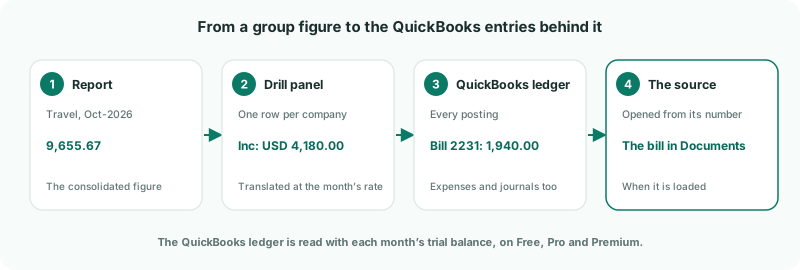
BrizoConsol reads each QuickBooks company’s general ledger with its monthly trial balance, so every posting is there — invoices and bills, payments, expenses and journal entries alike. The nightly read keeps the last 12 months current; you don’t need to switch anything on.
2Open the drill panel
- Select Your Group, and open Reports → Profit & Loss for Oct-2026.
- Click the October amount on the Travel row.
The drill panel lists each company’s balance on the account. Its Data Type is qbo, and In Local is the amount in the company’s own currency — USD 4,180.00 for Maple Inc, translated at 0.7400 USD per SGD to SGD 5,648.65.
3Read Maple Inc’s QuickBooks postings
- Click Maple Inc’s row — rows with postings behind them show a ▸ caret.
- Read the source rows: one for each ledger line that posted to the account in October.
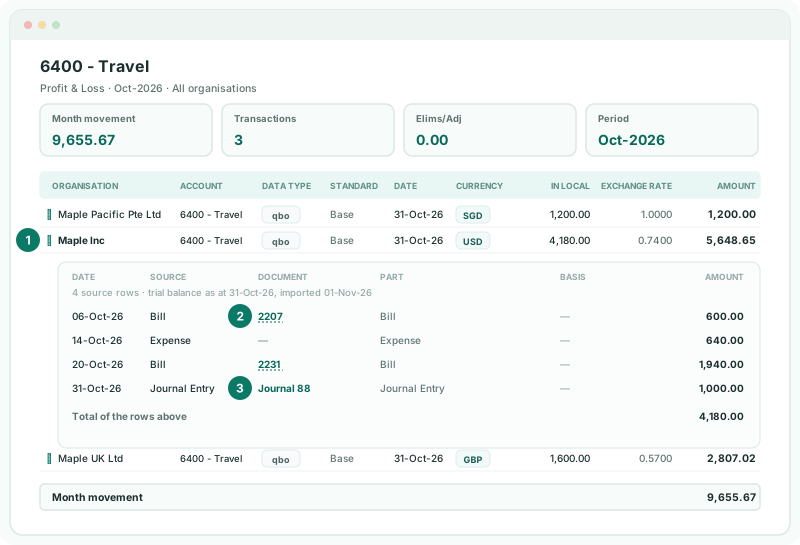
| Source | The transaction type, in QuickBooks’ own words — Bill, Expense, Invoice, Payment, Bill Payment (Check), Journal Entry and so on. Part repeats it. |
|---|---|
| Document | The transaction’s number in QuickBooks. A journal entry shows as Journal 88; a transaction with no number, like many expenses, shows a dash. |
| Amount | In Maple Inc’s currency, USD, as in QuickBooks’ ledger. The rows add up to its In Local amount. |
Entries that cancel each other out are hidden; click Show N postings that offset each other to see them.
4Open the source
A number is a link when it matches an invoice or bill BrizoConsol has loaded for the company. Click 2231, and Documents opens on that bill, with the supplier, date, status and lines.
Other postings — expenses, payments, journal entries — don’t open in BrizoConsol. Find them in QuickBooks by their date, type and number.
In the example, Journal 88 is a month-end accrual of 1,000.00 for travel claims not yet submitted. With the 1,940.00 bill for a sales trip, it explains why October is high.
Check
Maple Inc’s source rows add up to its USD 4,180.00 in the drill panel. If not, a red line under the table says how much of the movement isn’t reconciled to a document.
Bills and invoices older than the last 6 months may not be loaded, so their numbers aren’t links. Load the month with Invoices and Bills ticked to make them open.
5Trace a balance sheet figure
On a balance sheet account, such as accounts receivable, the trail also shows where the month started and ended: the opening balance, the month’s movement and the closing balance, with the QuickBooks postings that moved it listed underneath.
The month’s movement is the balance at the end of October less the balance at the end of September, so September’s trial balance must be loaded too. In a year-to-date view, the movement is YTD movement, and the rows run from the start of the company’s fiscal year.
6When the trail stops
If BrizoConsol can’t show the QuickBooks postings, a notice above the table says why:
| QuickBooks ledger lines for Oct-2026 are not loaded for Travel. Load that month again to read its ledger. | Reload the month on Data Loading with GL ticked. |
|---|---|
| The month before Oct-2026 has no imported QuickBooks trial balance… | Load September on Data Loading, then drill again. |
| No QuickBooks Actual trial balance is imported for Oct-2026. | Load the month’s trial balance first. |
| Source postings belong to one account, and this row is a group of them. | You drilled a total. Drill a single account’s amount. |
| QuickBooks ledger lines explain the local Actual import only… | The report is on another scenario, such as Budget, or another accounting standard. Switch to Actual and the base standard. |
| A message about the edition | Ledger detail needs the Free, Pro or Premium edition. On Standard, the trail stops at the drill panel. |
| …of the movement in the row above is not reconciled to a document here. | Part of the month’s movement has no ledger line in what was loaded. Reload the month with GL ticked. |
Want more detail? See the documentation