
QuickBooks Online Groups · Track 2 · Tutorial 2 of 3
Eliminate intercompany invoices and bills
When your QuickBooks companies charge each other, one raises an invoice and the other records the bill, each naming the other as a customer or supplier. BrizoConsol can use those documents to eliminate the charge — and, because your companies keep different currencies, treat the difference as FX.
1List what your QuickBooks companies charge each other
In Your Group, two intercompany items go through QuickBooks in October 2026:
| Monthly management fee | Maple Inc invoices Maple UK Ltd USD 20,000 (invoice 1031) to 4500 Management Fee Income. Maple UK Ltd enters the bill in USD, and QuickBooks records it in GBP to 6500 Management Fees. Only intercompany amounts go through these accounts — a rule handles it (steps 2–4). |
|---|---|
| Goods sold to Singapore | Maple Inc invoices Maple Pacific Pte Ltd USD 30,000 (invoice 1045) to 4000 Sales, the same account as its outside customers. A rule can’t pick out the Singapore part of 4000, so you eliminate the documents (step 5). |
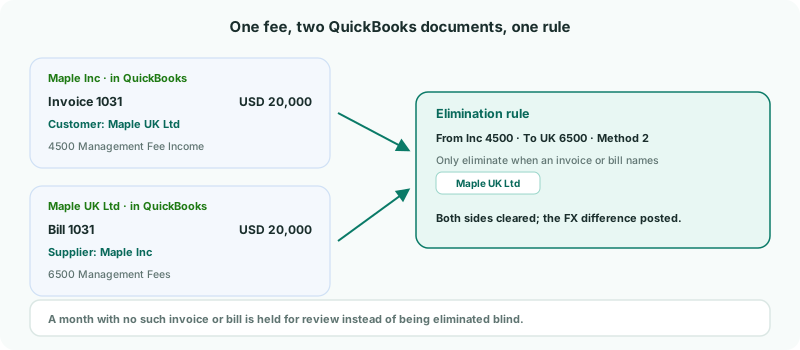
In QuickBooks, set each sister company up as a customer or supplier under its real name — Maple UK Ltd, not Maple London. BrizoConsol finds the documents by those names.
2Add a rule for the fee
- Select Your Group, and open Intercompany → Elimination Rules.
- Click Add an Auto Elimination Rule.
- Enter the Description Inc management fee to UK, and choose the Intercompany Type Management Charges.
- Choose Method 2: Use the amount in both Organisations.
- Under Leg Scope, choose Maple Inc and 4500 as the From side, and Maple UK Ltd and 6500 as the To side.
Why Method 2: Maple Inc’s USD 20,000 and Maple UK Ltd’s GBP expense almost never translate to the same SGD amount, because QuickBooks converted the bill at its own rate and the group translates each company’s figures at the month’s average rate. Method 2 clears each side at its own amount and posts the small difference to the treatment you choose. Method 1 would hold the month for review whenever the difference is over the tolerance.
3Only eliminate when the invoice exists, and treat the rest as FX
- Under Only eliminate when an invoice or bill names, tick Maple UK Ltd under Customers.
- Set Default residual treatment to FX, and choose the Treatment account for exchange differences.
- Click Confirm.
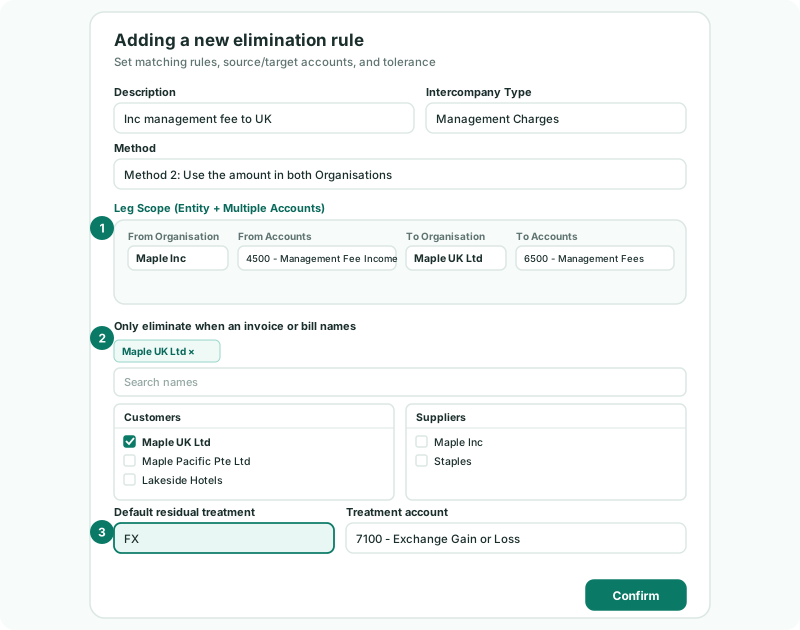
| Where the names come from | The customers and suppliers on the invoices and bills of the two companies in the rule. Choose the companies first; the lists fill from their documents. |
|---|---|
| What counts | An invoice or bill of either company, dated in the month, naming Maple UK Ltd, with an amount on it. A voided document doesn’t count. |
| How names are compared | Ignoring capitals, punctuation and endings such as Inc, Ltd or Pte Ltd. So Maple Ltd and Maple Pte Ltd would count as the same name: give sister companies names that differ by more than their ending, as Maple UK Ltd and Maple Pacific Pte Ltd do. |
Saving the rule recalculates the group: October’s fee is eliminated, and the difference is posted to the FX account. The entry is listed in Elimination Review, where you can adjust the treatment.
The check needs the month’s invoices and bills in BrizoConsol. The nightly read brings in the last 6 months; for an older month, reload it with Invoices and Bills ticked.
4Deal with a month the invoice is missing
In November, the month is loaded before Maple Inc’s invoice has been entered in QuickBooks. The rule doesn’t post. It holds the entry in Intercompany → Elimination Review, with the reason:
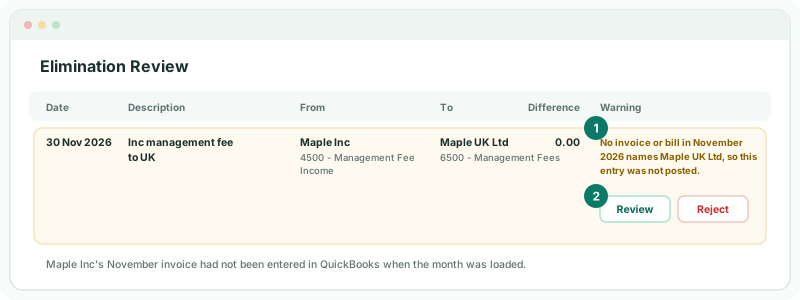
| The invoice is just late | Enter it in QuickBooks and reload November for Maple Inc. The rule then finds it and posts on its own. |
|---|---|
| The fee was booked without an invoice | Click Review, check the entry, and click Confirm & Replace to post it anyway. |
| The amounts shouldn’t be eliminated | Click Reject. |
5Eliminate the sale to Singapore from its documents
Maple Inc’s 4000 Sales also holds sales to outside customers, so eliminate the October sale from the QuickBooks invoice and bill themselves:
- Open Intercompany → Sales / Purchases / Services, keep the scenario on Actual and Oct-2026, and click Add a new Elimination Entry.
- Click Documents at the top of the dialog.
- On the From side, choose Maple Inc and 4000 Sales; on the To side, Maple Pacific Pte Ltd and its purchases account.
- Tick invoice 1045 and Maple Pacific Pte Ltd’s bill for it, or click the match button to pair them.
- Check the lines, and click Confirm, allocating any difference to FX difference.
The full dialog is in Clear intercompany balances.
Document entries aren’t included in the Standard edition. There, post a GL entry for the amounts instead.
Check
On the group Profit & Loss for Oct-2026 with Show Entities on, the eliminations cancel the fee income against the fee expense, and the sale to Singapore against its purchase. On Month End Status, the Eliminations card shows Posted.
6If something goes wrong
| The name lists are empty | No invoices or bills are loaded for those companies. Reload a month with Invoices and Bills ticked. |
|---|---|
| The sister company isn’t in the name list | It has no invoice or bill in the loaded months, or is a customer or supplier under another name in QuickBooks. Fix the name in QuickBooks and reload. |
| Every month lands in Elimination Review | The invoices name the company differently from the name you ticked, or are entered after the month is loaded. Check the customer name in QuickBooks, and reload the month once the invoice is in. |
| The rule posts in a month with no fee invoice | Another document that month names Maple UK Ltd — any invoice or bill between the two counts. |
| A large amount lands in FX | It isn’t an exchange difference: one side is missing or wrong, such as a bill entered for the wrong amount. Fix it in QuickBooks and reload. |
Want more detail? See the documentation