
Budgets and Forecasts · Track 1 · Tutorial 2 of 3
Set the plan’s opening balances
Available on ProPremium
A budget balance sheet has to start from somewhere before its own movements are added. You choose, year by year, which position each budget year opens from.
1Choose the source for each year
| Last actual YTD | The actual balances. |
|---|---|
| Forecast year end | The forecast’s position at the year end. It needs a forecast that reached that year end. |
| Last budget close | The previous year’s budget at its close. It needs a budget for the year before. |
Whichever you choose, it is read at the day before the budget year starts — for a 2027 budget, 31 December 2026. In the running example the reporting month is Oct-2026 and the forecast runs to December, so the 2027 budget opens from Forecast year end.
2Set it
- Select Your Group, and open Settings → Organisation Settings → Organisation Details.
- In the Budget Opening Balances row, click the edit icon.
- In Budget opening balances, choose the Budget year 2027, and in Opening balances from choose Forecast year end.
- Click Confirm.
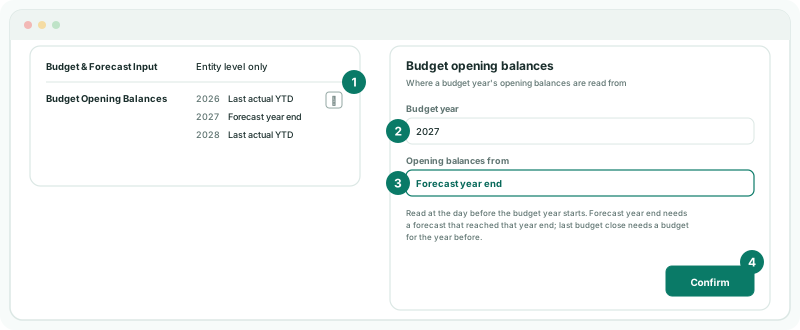
The row lists the current year and the next two, and any other year already set. Set and confirm each year you budget, one at a time, even when the row already shows the source you want.
3Check the opening
- Open Forecast → Balance Sheet for Your Group, and note the December 2026 balances.
- Open Budget → Balance Sheet, and choose 2027.
Check
Each Jan-2027 budget balance is the forecast’s December 2026 balance plus January’s budget movement on that account.
4If something goes wrong
| What you see | What to do |
|---|---|
| The 2027 budget opens from nothing | The source has no figures at 31 December 2026: Forecast year end needs a forecast that runs to December 2026. Complete the forecast, or choose another source. |
| The budget opens from the wrong position | Open the dialog, choose the year, and check the source. Click Confirm for that year. |
| There is no edit icon in the row | Only an Administrator can change the source. |
Want more detail? See the documentation