
Budgets and Forecasts · Track 1 · Tutorial 1 of 3
Choose where plans are entered
Available on ProPremium
Budgets and forecasts can be entered company by company, once for the whole group, or both. The choice decides who owns each plan, and whether intercompany eliminations, CTA and NCI are worked out for it.
1Know the three levels
| Entity level only | Each company enters its own budget and forecast, in its own chart of accounts or the Common Chart of Accounts. The group plan is the companies’ plans consolidated. |
|---|---|
| Consolidated level only | The plan is entered once for the group, in the Common Chart of Accounts. Companies’ own budget pages can’t be typed into. |
| Entity and consolidated level | Both are allowed. |
Elimination rules, CTA and NCI are worked out from each company’s figures. Choose a level that includes the companies if the group plan should be consolidated the way the actuals are — see the Consolidate the plan track. Your Group uses Entity level only.
2Set the level
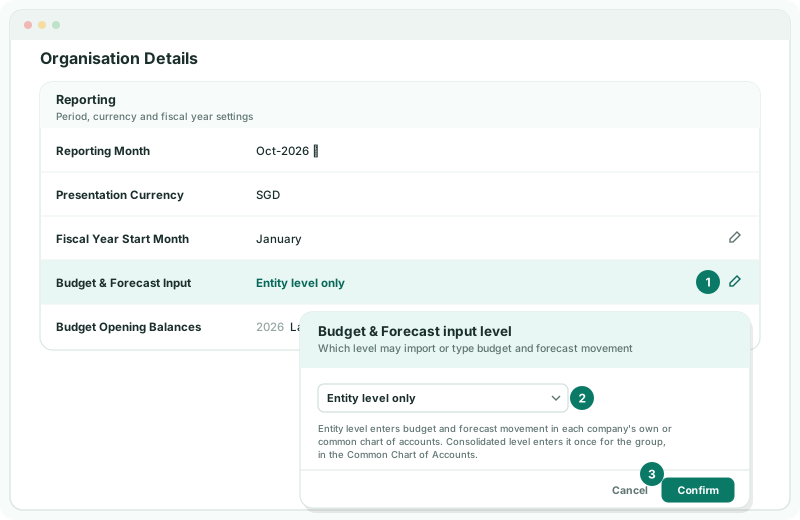
- Select Your Group, and open Settings → Organisation Settings → Organisation Details.
- In the Budget & Forecast Input row, click the edit icon.
- In Budget & Forecast input level, choose Entity level only, and click Confirm.
The setting belongs to the group: every company in it follows the same level. Only an Administrator sees the edit icon.
3Check where input is open
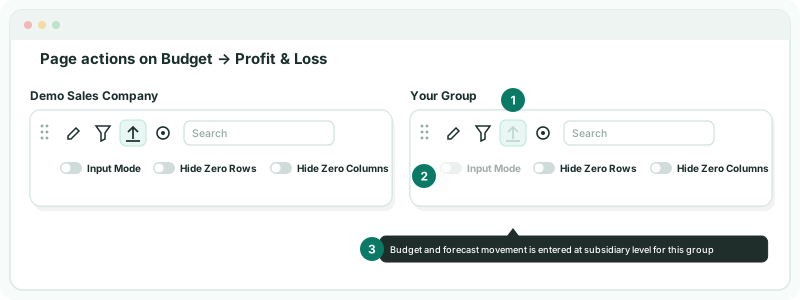
- Select Demo Sales Company, and open Budget → Profit & Loss.
- Select Your Group, and open Budget → Profit & Loss again.
Check
On Demo Sales Company the Import icon and the Input Mode switch can be used. On Your Group both are greyed out, and hovering over them says Budget and forecast movement is entered at subsidiary level for this group.
4If something goes wrong
| What you see | What to do |
|---|---|
| There is no edit icon in the row | Only an Administrator can change the level. |
| Hovering over Import says Budget and forecast movement is entered at the consolidation level for this group | The level is Consolidated level only. Enter the plan on Your Group, or change the level. |
| The Budget menu can’t be used | Budgets and forecasts are not included in the Standard edition. |
Want more detail? See the documentation