
Insight Packages · Track 1 · Tutorial 4 of 11
Add report sections
Most packs are built around reports: the profit and loss, the balance sheet, cash flow. Each one becomes a section that reads the report live.
You will needAn Administrator, Report Admin or Dashboard Admin of Your Group. A saved report, such as Management P&L.
By the endA Management P&L section in the package, starting on a new page.
1Add the section
- Open Insight Packages → Custom, and click Edit on the package.
- Click Manage sections.
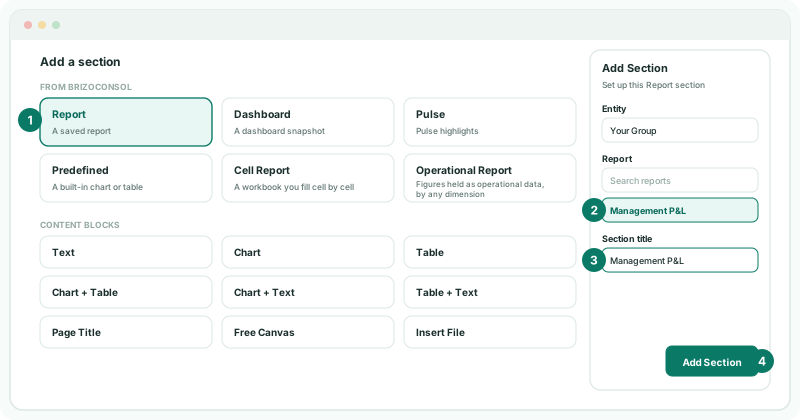
- Click + (Add a section), and choose Report.
- In Entity, keep the group, or choose one entity. Each entity offers the reports its own accounting standards allow.
- Under Report, search for and choose Management P&L. Each report is marked with its standard, such as IFRS, or Standard report, or Custom report.
- In Section title, type the name the contents should show.
- Click Add Section.
2Lay the section out
The bar above the section’s page sets how it sits in the package. Each change shows on the page at once.
| Section / Subsection | A numbered section, or a heading nested under the section above. The first section can’t be a subsection. |
|---|---|
| Start from new page | Starts the section on a page of its own. |
| Show title | Prints the section’s heading on its page. |
| Page orientation | Use package setting, or turn this section Portrait or Landscape. |
3Order and save
- In the section list, drag a section to move it.
- Use Filter sections to find a section in a long package, and Delete to remove one.
- Click Save changes.
Check
The Management P&L section shows the same figures as the report for the package’s month, and the contents list it under its title.
4If something goes wrong
| What you see | What to do |
|---|---|
| This report appears here once the package is saved. | Click Save changes. |
| A report is missing from the list | The chosen entity’s accounting standards don’t offer it. Choose the entity the report belongs to. |
Want more detail? See the documentation