
Ownership and NCI · Track 5 · Tutorial 2 of 3
Reconcile the NCI and associate entries
Before the month is reported, check every journal the NCI and the equity method posted, and every one posted by hand. The two reconcile pages list them month by month, show whether each balances, and open each one to its lines. The NCI Report explains how a figure was worked out; these pages show what was actually posted.
1Open the NCI reconcile page
- Open Ownership & Equity → NCI. The page is titled NCI Reconcile / Verify.
- Choose Actual as Scenario, and Oct-2026 as Period. The arrows beside it step to the previous or next month.
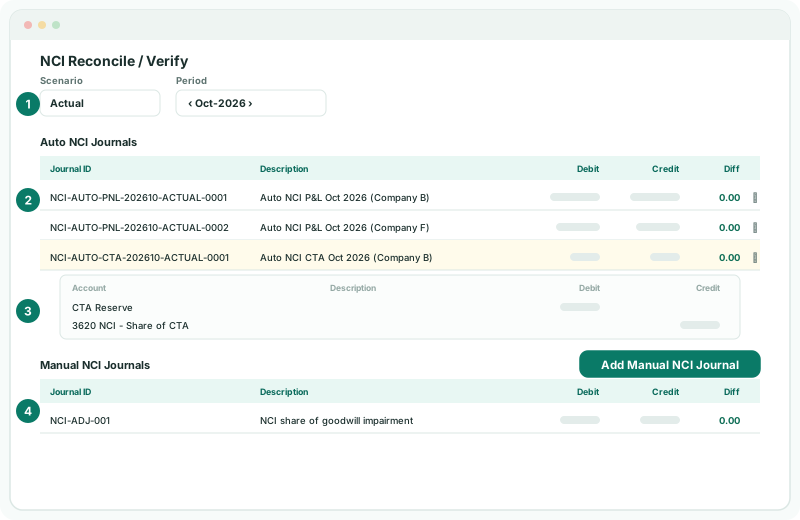
The page lists two kinds of journal: Auto NCI Journals, which BrizoConsol posted, and Manual NCI Journals, which someone posted by hand.
2Read the auto journals
Each row is one journal: its Date, Journal ID, Journal Type, Organisation, Source, Description, Debit, Credit and Diff. The journal ID says what it is:
| Journal ID begins | What it posts | Description |
|---|---|---|
| NCI-AUTO-PNL | The NCI’s share of a subsidiary’s profit for the month, at the month’s average rate. | Auto NCI P&L Oct 2026 (Company B) |
| NCI-AUTO-CTA | The NCI’s share of the month’s translation reserve. | |
| NCI-AUTO-GWFX | Foreign goodwill retranslated at the closing rate, with the difference in the translation reserve. | |
| NCI-AUTO-OWN | The NCI’s share of net assets and other reserves, in a month in which the ownership changed. | Auto NCI ownership month… |
| NCI-AUTO-FYE | The NCI’s share of net assets and other reserves, for the financial year. | Auto NCI posting fiscal year-end… |
| NCI-AUTO-ACQ | An acquisition, a purchase or sale of part of a stake, or a loss of control, in its month. | Auto NCI acquisition-date posting… |
The rest of the ID is the month, the scenario and a number, so the same entry for another month or for the budget has its own ID.
3Check each Diff
Diff is the journal’s debits less its credits. It shows green at 0.00 and red otherwise.
Check
Every row in both lists has a Diff of 0.00. A journal that doesn’t balance would put the balance sheet out by the same amount.
To see what a journal posted, click its row, or Show entries with the number of lines. Each line shows its Account, Description, Debit and Credit. Click again — Hide entries — to close it.
4Add a manual NCI journal
Some NCI entries need judgement BrizoConsol can’t apply, such as an NCI share of a goodwill impairment under full goodwill, or a correction agreed with the auditors.
- Click Add Manual NCI Journal.
- Choose the Related company — each is listed with its relationship, such as Company B · Subsidiary — enter the date, journal ID, description and lines, and click Confirm.
It is posted as a journal of type NCI, listed under Manual NCI Journals for its month. A manual NCI journal needs a related company, and at least one debit and one credit line with an amount.
5Delete a journal posted in error
- Click the delete icon in the row’s Action column.
- In Delete NCI Journal Entry, click Delete NCI Journal.
Delete manual journals posted in error. An auto journal is BrizoConsol’s own: if you delete one, it is posted again the next time the group recalculates, so correct its cause — an ownership record, an account, a rate — instead. In a locked month, the delete icon is disabled and reads Period locked.
6Reconcile the associate entries
- Open Ownership & Equity → JV / Associate. The page is titled JV/Associate Reconcile / Verify.
- Choose the same scenario and period.
It works the same way, with Auto JV Journals — JV-AUTO-COST for an associate’s cost or sale proceeds, and JV-AUTO-PNL for each month’s equity method — and Manual JV Journals, with Add Manual JV Journal. Manual JV journals are covered in Adjust the equity method by journal.
7Close the month
- Open Month End Status for Oct-2026.
Check
The NCI / JV card shows Posted. On Reports → Balance Sheet, the balance sheet balances.
8If something goes wrong
| What you see | What to do |
|---|---|
| No auto journals for a subsidiary | It has an amber dot on the Ownership page, or posting accounts are still to choose. Check Group structure. |
| A red Diff on a manual journal | Edit it in Adjustments → Consolidation Journals so its lines balance. |
| An auto journal’s amount looks wrong | Read the same month on the NCI Report to see how it was worked out. |
| An auto journal you deleted is back | That is expected: it is reposted at each recalculation. Correct its cause. |
| CTA, NCI, and JV journals require a related subsidiary selection. | Choose the Related company on the manual journal. |
| Period locked | The month is locked. Ask whoever manages the lock. |
Want more detail? See the documentation