
Operational Data · Track 1 · Tutorial 10 of 10
Load operational data through the API or Zapier
When the figures already live in another system, such as an HR system or a spreadsheet the team updates, that system can send them to BrizoConsol each month. Both routes write to the same place: a dataset in Operational Data.
1Choose the route
| Route | Suits | Set it up |
|---|---|---|
| API | A system your developer can change: it calls BrizoConsol with its own credential. | Send data from your own systems, ticking Operational data under What it may write |
| Zapier | A spreadsheet or app Zapier connects to, with no code. | Automate monthly imports with Zapier |
For the API, the calls are POST /api/v1/organisations/{id}/operation-data/validate to check a month without writing, and POST /api/v1/organisations/{id}/operation-data to write it. GET /api/v1/schemas/operation_data lists the fields. Zapier writes the same data with the tool import_operation_data.
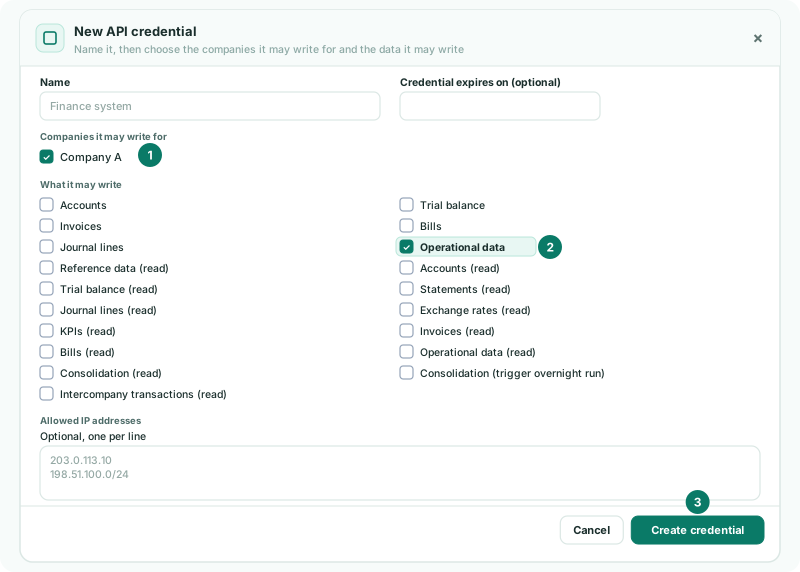
2Name the feed once
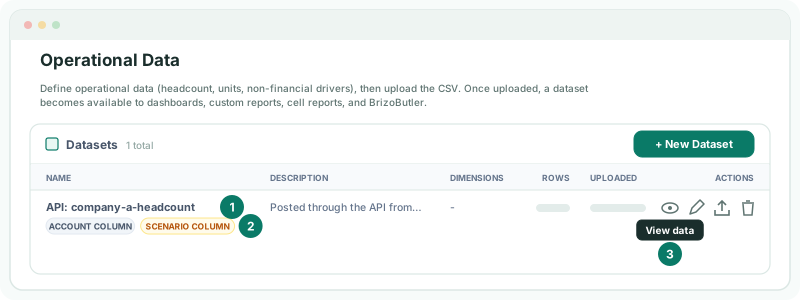
Every request carries a source_reference, your own name for the feed, such as company-a-headcount. It names the dataset the data goes to, API: company-a-headcount, so keep it the same every month. A new name starts a new dataset.
Each row is recognised by its month, scenario, dimensions and account, so a month sent again replaces those rows rather than adding a second copy.
3Check the first month
- Select the company the feed writes for, open Operational Data, and click View data on the dataset.
Check
The dataset is named API: and your source_reference, and its rows for the month match what the system sent.
4If something goes wrong
| What you see | What to do |
|---|---|
| The request is refused for the company | The credential or the AI Access settings do not allow writing Operational data for that company. Tick it and save. |
| Two datasets for one feed | The source_reference changed. Send every month with the same one. |
| Zapier is not offered the write tools | Writing through Zapier needs Premium and Operational data ticked under What they may write. |
Want more detail? See the documentation