
Foreign Currency · Track 4 · Tutorial 1 of 3
Present the group in another currency
Your group reports in one currency, but a parent abroad, a lender or an investor may want the figures in theirs. Any consolidated report can be shown in another currency, re-expressed from the group’s own figures at the rates you keep.
1Know what another currency does
Your Group reports in SGD. Its US investor wants the monthly figures in USD.
| What changes | The figures on screen. Each line of the consolidated report, in SGD, is re-expressed in USD at the group’s USD rates: balance sheet lines at the month’s Closing Rate, profit and loss lines at each month’s Average Rate. |
|---|---|
| What doesn’t | The consolidation. The group is still consolidated, eliminated and translated in SGD; nothing is posted, and the group’s currency stays SGD. |
Because the balance sheet uses one closing rate and the profit and loss the monthly averages, a year’s profit in USD won’t exactly equal the change in retained earnings in USD. There is no second CTA for the difference. For statements that must be fully translated into USD, the group’s own currency would have to be USD.
2Add the currency’s rates
- Select Your Group, and open Settings → Global Settings → Exchange Rates.
- If USD isn’t listed, click Add a new currency, choose USD and click Add.
- Check USD has an Average Rate and a Closing Rate for every month you will show, and click Save.
Like every rate, it is units of USD per 1 SGD — 0.7652 for October’s closing rate. Auto Exchange Rate fetches rates only for the currencies of the group’s companies, so enter USD’s rates yourself, for Actual as well as Budget and Forecast. Adding the currency and entering rates need Auto Exchange Rate off.
3Show the report in USD
- Open Reports → Balance Sheet for the group, for Oct-2026.
- In the report’s currency selector, choose USD.
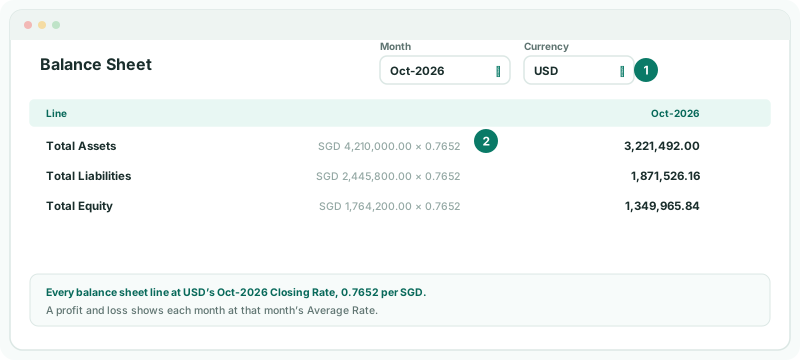
The same selector is on the profit and loss, the cash flow, the IFRS statements and your own reports.
4Check the figures
Check
Total Equity in USD is the SGD figure at October’s closing rate: 1,764,200.00 × 0.7652 = 1,349,965.84. Total Assets still equals Total Liabilities plus Total Equity, because every balance sheet line uses the same rate.
5If something goes wrong
| USD isn’t in the currency selector | The selector lists the group’s currency and the currencies on Exchange Rates. Add USD there. |
| A month shows nothing, or zero, in USD | USD has no rate of that type for the month. Enter it. |
| The figures are many times too big or small | The USD rate is the wrong way round. It must be USD per 1 SGD. |
| The currency selector isn’t there | The subscription is on Standard, which shows reports in the group’s currency only. |
Want more detail? See the documentation