
Foreign Currency · Track 2 · Tutorial 4 of 4
Correct the CTA with manual journals
The automatic CTA covers each foreign company’s own figures. A few exchange differences sit elsewhere and belong in the CTA reserve too. For those, and only those, you post a manual CTA journal.
1Know when a manual journal is right
Company A has lent Company C money with no plan to be repaid: in substance, it is part of the group’s investment in Company C. Company C books the exchange difference on the loan in profit or loss, in 7200 FX Gain/Loss. In the group’s accounts it belongs in the CTA reserve, with the rest of Company C’s translation. In October the loss is SGD 400.00.
| Post a manual CTA journal | For a difference the automatic CTA can’t see, like this one, or an opening CTA brought over from the group’s accounts before BrizoConsol. |
|---|---|
| Don’t | To fix a wrong rate or a wrong account. Correct the rate on Exchange Rates or in the CTA settings, or the mapping, and the automatic CTA is posted again by itself. |
2Post the journal
- Select Your Group, and open Adjustments → Currency translation → CTA / FCTR. Choose Actual and Oct-2026.
- Click Add Manual CTA Journal. The date starts at the end of the month you are on.
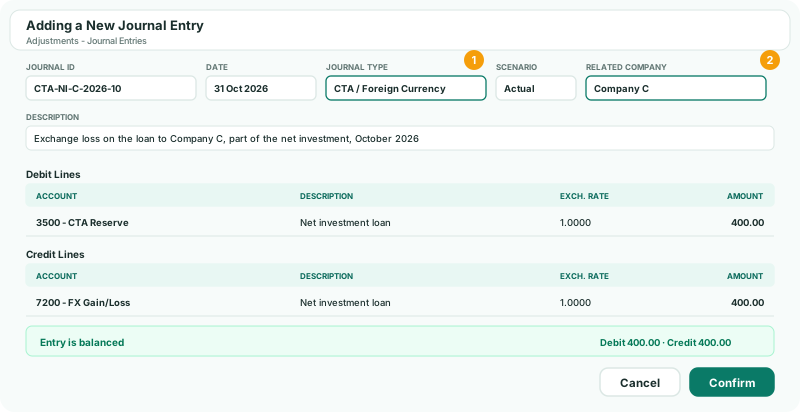
- Enter the Journal ID CTA-NI-C-2026-10. The Journal Type is CTA / Foreign Currency.
- In Related company, choose Company C.
- Enter a Description that says what the difference is.
- Debit 3500 CTA Reserve 400.00, credit 7200 FX Gain/Loss 400.00, check the entry is balanced, and click Confirm.
A manual CTA journal is for one month: it can’t recur. Post one each month with that month’s difference. For a gain, the lines run the other way.
3Check it, and remove it if needed
- The journal is listed under Manual CTA Journals. Click it to see its lines.
- To remove it, click its delete button, then Delete CTA Journal. A manual journal can’t be edited: delete it and post it again.
Check
October’s group profit and loss shows 400.00 less exchange loss, and the CTA reserve on the Balance Sheet is 400.00 more negative. The Auto CTA Journals are unchanged: a manual journal never changes them.
4If something goes wrong
| CTA journals require a related subsidiary selection. | Choose the company the difference relates to in Related company. |
|---|---|
| Please provide at least one debit and one credit line with amount greater than zero. | Enter both lines with their amounts. |
| Add Manual CTA Journal can’t be clicked | The subscription is on Standard or the Free plan’s limit is reached, or the group has no subsidiary or no accounts yet. |
| Period Oct 2026 is locked. Contact administrator. | The month is locked. Ask an administrator to unlock it. |
Want more detail? See the documentation