
Controls and Audit · Track 2 · Tutorial 4 of 4
Review the month with comments
A review question belongs on the figure it is about. A comment stays on that cell for that month, and mentioning a colleague sends it to them.
1Comment on a figure
- Open the report, such as the profit and loss for Your Group, for Oct-2026.
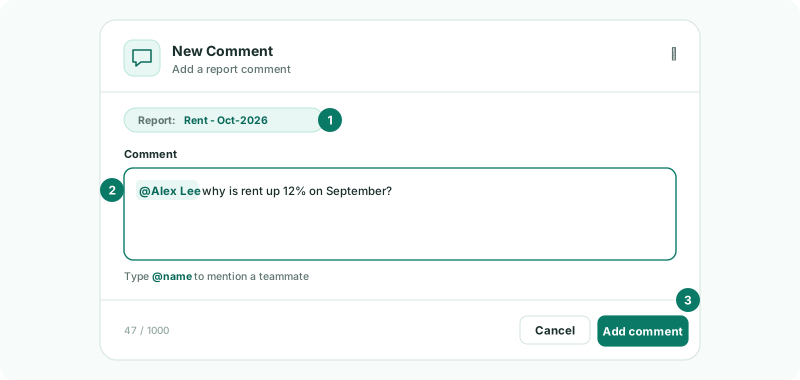
- Right-click the figure, and choose Add Comment.
- In New Comment, write the question. Type @ and a name to mention a teammate, such as @Controller.
- Click Add comment.
The cell is marked as having a comment, for everyone who opens the report. Hover over it to read the comments. A comment belongs to the account, the month and the scenario, so a Budget comment stays on the Budget figure.
2Answer what is sent to you
A mentioned teammate gets a New Comment notification under the bell: You have a new comment from, and the name. Clicking it opens the report.
Answer the same way: right-click the figure, add a comment, and mention the person who asked.
3Work through the month’s list
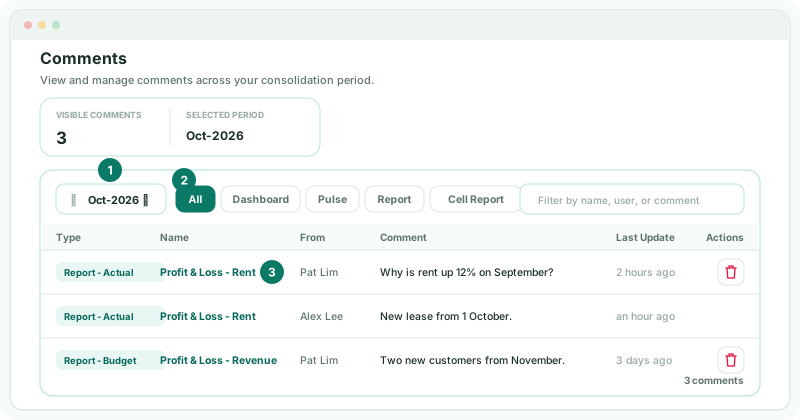
- Open Review → Comments. It opens on the reporting month; change it with the month selector.
- Use All, Dashboard, Pulse, Report or Cell Report to show one kind, or type in Filter by name, user, or comment.
- Click a comment’s name to open the figure it belongs to.
| Type | Where it was made, with the scenario, such as Report - Actual or Report - Budget. |
|---|---|
| Name | The report and account, dashboard or Pulse view. |
| From | Who wrote it. |
| Comment | The text. |
| Last Update | When it last changed. |
The page lists the comments you wrote and the ones sent to you, not everyone’s. To see every comment on a figure, open the report.
Check
Comments for October lists each of your questions and each one sent to you, and every cell you commented on is marked in the report.
4Tidy up
Administrators can delete a comment they wrote: click the delete icon and confirm in Delete Comment. Each deletion is recorded in the System Audit Trail as comment.deleted; each new report comment as report.comment_created.
5If something goes wrong
| What you see | What to do |
|---|---|
| Add Comment isn’t in the menu | Right-click the figure itself, in a report you can view. |
| A teammate didn’t get the notification | Mention them by choosing their name from the list after @, not by typing it. |
| No comments for Oct-2026 | Nothing was written or sent to you for that month. Check the month in the selector. |
Want more detail? See the documentation