
Security · Track 2 · Tutorial 3 of 3
Send data from your own systems
Available on Premium
When a company keeps its books in a system BrizoConsol doesn’t connect to, that system can send its figures itself through the BrizoConsol API. You create a credential that says what it may write and for which company; your developer does the rest.
1Know how it works
In the running example, Company C keeps its books in an in-house system. Instead of uploading a file each month, that system will send Company C’s trial balance to BrizoConsol.
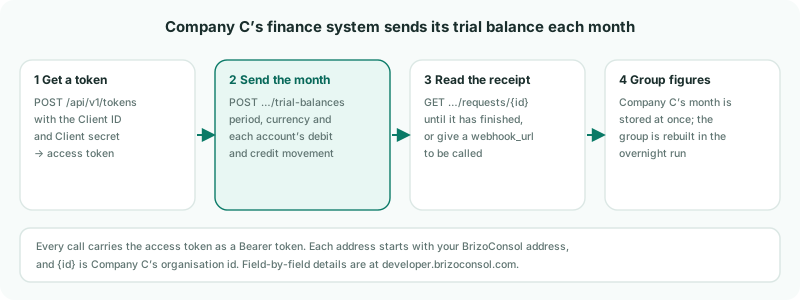
| The credential | A Client ID and Client secret, limited to the companies you tick and the data you let it write. |
|---|---|
| What it can write | Charts of accounts, trial balances, invoices, bills, journal lines and operational data — and a request to consolidate the group. |
| When the group moves | The company’s month is stored when the request finishes. The group’s figures are rebuilt in the overnight run. |
2Create the credential
- Select your group, and open Settings → Global Settings → Integrations → API Access.
- Click New credential.
- Enter a Name, such as Company C finance system.
- Under Companies it may write for, tick Company C.
- Under What it may write, tick Trial balance and Consolidation (trigger overnight run).
- Optionally, enter an expiry date and the IP addresses your system calls from, then click Create credential.
- Click Copy secret, and keep the Client ID and Client secret somewhere safe.
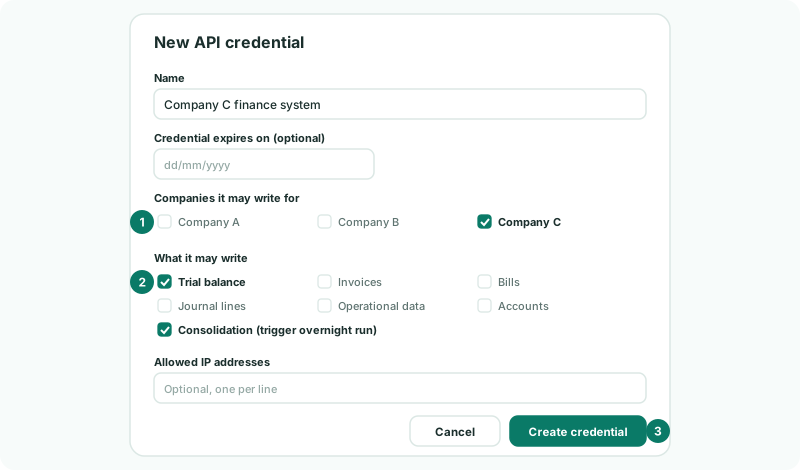
The secret is shown only once. If it is lost, revoke the credential and create a new one.
3Hand it to your developer
Give your developer the Client ID and secret, and these calls. Every address starts with your BrizoConsol address; the full field list is at developer.brizoconsol.com, and GET /api/v1/schemas/trial_balance answers it too.
| Call | What it does |
|---|---|
| POST /api/v1/tokens | Exchanges the Client ID and secret for an access token, sent as a Bearer token on every other call, and a refresh token. The answer lists the companies the credential may write, as organisation: and the company’s id. |
| POST /api/v1/organisations/{id}/trial-balances/validate | Checks a month without writing anything. |
| POST /api/v1/organisations/{id}/trial-balances | Writes the month, and answers with the request. |
| GET /api/v1/organisations/{id}/requests/{request} | Whether the request has finished. A webhook_url in the request is called once instead. |
| POST /api/v1/organisations/{id}/consolidation-requests | Asks for the group to be consolidated in the next overnight run. Asking again while one is pending adds nothing. |
4Agree what the month contains
| source_reference | Your own name for the feed, such as company-c-erp. Keep it the same every month. |
|---|---|
| period | The month, as YYYY-MM — 2026-10 for October 2026. |
| base_currency | The company’s currency: GBP for Company C. |
| value_basis, rate_direction | Both are required. company_base says the amounts are already in Company C’s own currency; the schema lists the values for each. |
| records | One per account: account_code, and the month’s debit and credit movement — movements, not closing balances. Add account_name for a code that isn’t in Company C’s chart yet. |
| mode | Leave it as replace_period: each month sent replaces that month from this feed, so a corrected month can simply be sent again. |
A month belongs to one source. If Company C’s October was already uploaded, the first API month is refused until the request sets switch_source to take it over.
5Check the first month
- On API Access, check the credential’s Last used.
- Select Company C, and open its trial balance for October 2026.
- The next morning, select your group and open the consolidated reports for October.
Check
Last used shows when the system got its token. Company C’s trial balance for October matches its own system. After the overnight run, the group’s reports include it.
6If something goes wrong
| API Access isn’t under Integrations, or shows Upgrade to Premium for API Access | API Access is on the Premium plan only, for Administrator or Data Loading Admin access. |
| The token call is refused | The Client ID or secret is wrong, or the credential is revoked or expired. Create a new credential. |
| Another write is in flight for this organisation. Send this one again when that has finished. | Only one write runs at a time for a company. Wait for the first, then send again. |
| The month is refused because another source already holds it | Set switch_source on the request to take the month over. |
| Company C’s month is right, but the group hasn’t changed | The group is rebuilt overnight. Send a consolidation request after the month, and check the next day. |
Want more detail? See the documentation