
Read and Customise Reports · Track 4 · Tutorial 1 of 2
Report a subgroup with a virtual group
The hierarchy follows ownership, but readers often want another cut: one region, one business line, the companies a lender has security over. A virtual group adds up any companies you pick, for reporting only. The hierarchy and the consolidation don’t change.
1Know what a virtual group adds up
| What it holds | The companies you tick, from anywhere in the subscription. A company can be in several virtual groups. |
|---|---|
| Its figures | The companies’ own figures added together, translated into the currency of the subscription’s top group. |
| What it leaves out | Eliminations, journals, the NCI and the CTA. They are posted to the group they belong to, not to a virtual group. So a sale between two companies in the virtual group is still in its revenue. |
| What it doesn’t change | The hierarchy, the consolidation and every other report. |
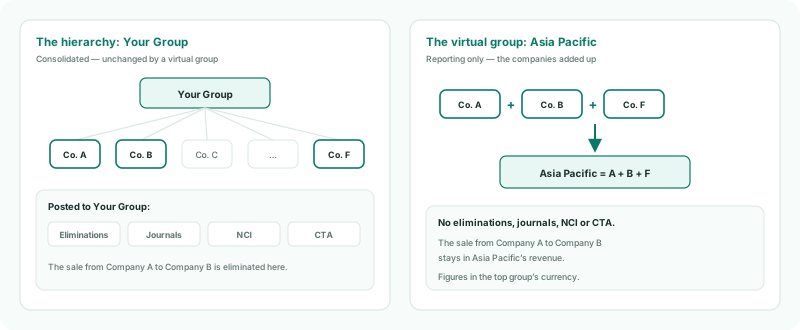
Use a virtual group to see a set of companies side by side and in total. Where the figures have to be consolidated — with intercompany removed — the companies need a group of their own in the hierarchy.
2Create the virtual group
- Open Settings → Global Settings → Virtual Group, and click Add a Virtual Group.
- Enter the Name Asia Pacific.
- Tick Company A, Company B and Company F, and click Add.
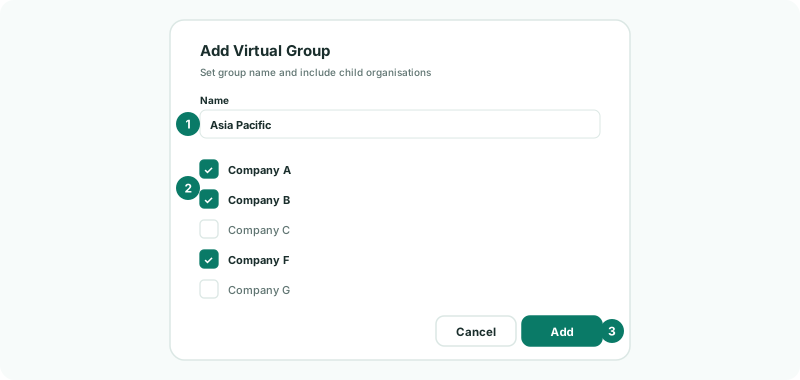
The list has every company in the subscription, not the groups: a virtual group is built from companies. To change it later, click Edit on its row, change the ticks and click Update. Delete removes the virtual group only; the companies stay as they are.
3Report the virtual group
- In the entity selector, choose Asia Pacific. Virtual groups are listed with the other entities.
- Open Reports → Profit & Loss for Oct-2026, and turn on Show Entities.
There is a column for Company A, Company B and Company F, and their total.
A virtual group is not a kind of report: it is an entity you report on. Every report on the All Reports page works for it as for any entity — the built-in statements, your row/column reports and your Cell Reports — and so do dashboards. A report of your own appears on Asia Pacific when it is shared with This subscription; one kept to This organisation stays on the entity it was saved on.
4Check the figures
Check
On Asia Pacific’s Profit & Loss, each company’s column is the same as in its column on Your Group’s Profit & Loss with Show Entities, and the total is the three added up. Company C isn’t there.
5If something goes wrong
| Group already exists | A virtual group with that name already exists. Choose another name, or edit the one there. |
| A group isn’t in the list of companies | Only companies can be ticked. Tick the companies under that group. |
| Revenue is higher than in the group’s consolidation | Expected when the companies trade with each other: a virtual group isn’t eliminated. |
| The virtual group shows nothing | No companies are ticked, or their months aren’t loaded. |
Want more detail? See the documentation