
Dashboards and KPIs · Track 4 · Tutorial 2 of 3
Follow cash flow, receivables and payables
Cash, what customers owe and what the group owes suppliers move every day. The three Pulse pages put them on one screen each, each with a Health Score.
1Follow cash
- Open Pulse → Cashflow Analysis and choose Oct-2026.
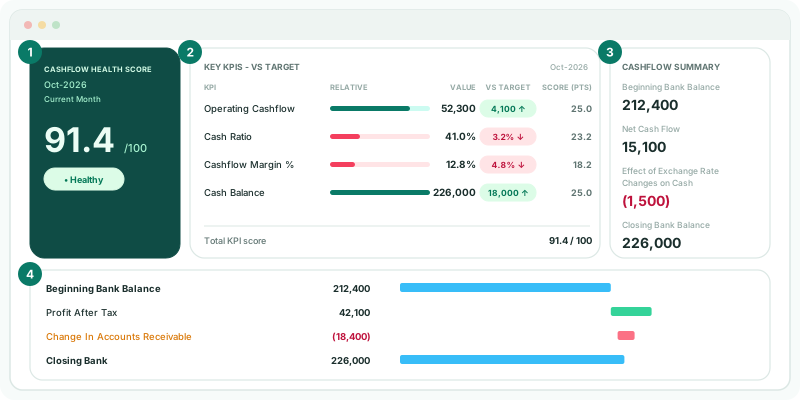
- Read Cashflow Summary on the right.
Beginning Bank Balance + Net Cash Flow + Effect of Exchange Rate Changes on Cash = Closing Bank Balance. If the net cash flow is negative, it shows in red.
Below, the Cashflow Analysis statement runs from Beginning Bank Balance through Cashflow from Operations, Cashflow from Investing and Cashflow from Financing to Closing Bank. Each line has a bar: blue for opening and closing, green for an inflow, red for an outflow.
2Follow receivables
- Open Pulse → Receivables for Oct-2026.
- Read the Receivable Health Score and Key KPIs - Vs Target, as on Cashflow Analysis.
- Read Account Receivables in the Receivables panel.
Account Receivables is the ACCOUNTS RECEIVABLE balance in the ledger at the end of the month. When a KPI in the panel is At Risk, Off Track or Critical, a banner names the worst one, with its value against its target.
When the group has no invoice data, the page shows the AR Balance Trend: Account Receivables and Total Receivables over the last 6 months.
3Follow payables
- Open Pulse → Payables for Oct-2026.
- Read the Payables panel: Account Payables, Operating Expenses and Overdue Bills.
- Under Unpaid Bills, click a status, such as Overdue, to list only those bills.
| Account Payables | The ACCOUNTS PAYABLE balance in the ledger at the end of the month. |
|---|---|
| Operating Expenses | The EXPENSE section for the month. |
| Overdue Bills | The number of unpaid bills already past their due date. |
| Unpaid Bills | Each unpaid bill with Bill ID, Supplier, Status, Bill Date, Due Date and Amount Due. Where the accounting system offers a link, the Bill ID opens the bill there. |
Bills come from companies connected to Xero, QuickBooks, MYOB or Zoho, or from bills imported. Without them the panel reads No bills data and the page shows the AP Balance Trend instead.
Check
Account Receivables and Account Payables for Oct-2026 equal Accounts Receivable and Accounts Payable on the Balance Sheet at October. On Cashflow Analysis, Beginning Bank Balance + Net Cash Flow + Effect of Exchange Rate Changes on Cash equals Closing Bank Balance.
4If something goes wrong
| What you see | What to do |
|---|---|
| No bills data | No company in the group has bills: connect it to Xero, QuickBooks, MYOB or Zoho, or import its bills. |
| Unpaid bills are not available for this data source | The figures come from balances only. Account Payables and the trend still work. |
| A Bill ID shows Not set | The bill has no number in the accounting system. |
Want more detail? See the documentation