
Operational Data · Track 1 · Tutorial 3 of 10
Choose the period weighting: Sum or Last Period
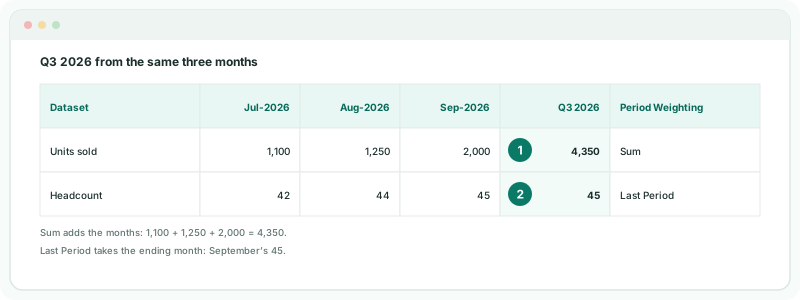
A report for a quarter or a year has to turn monthly figures into one. Units sold add up over the months; headcount does not. Period Weighting tells BrizoConsol which way to read each dataset.
You will needThe Units sold dataset from Create a dataset and upload a CSV, and monthly headcount by department in a CSV.
By the endA Headcount dataset that shows the ending month for a quarter or a year, beside Units sold, which shows the total.
1Create the Headcount dataset
- Open Operational Data, click New Dataset, then Upload a file if a choice of source appears.
- Name it Headcount, with one dimension, Department.
- Set Period Weighting to Last Period, and click Next.
- Upload the headcount CSV, as in Create a dataset and upload a CSV.
2Know which to choose
| Choose | For | A quarter shows |
|---|---|---|
| Sum | Flows: units sold, hours worked, orders, visits | The three months added together |
| Last Period | Positions: headcount, stores open, customers at month end | The quarter’s last month only |
With Last Period, a period whose ending month has no data shows no value, even if earlier months do. Custom KPI formulas keep their own basis.
Check
In a report for Q3 2026, Units sold shows July, August and September added together, and Headcount shows September’s figure.
3If something goes wrong
| What you see | What to do |
|---|---|
| Headcount for a quarter is three times too large | The dataset is on Sum. Click Edit definition on the dataset and change Period Weighting to Last Period. |
| Headcount is blank for the year to date | The current month has no headcount yet. Upload it, or report to the last month that has data. |
Want more detail? See the documentation