
Operational Data · Track 1 · Tutorial 8 of 10
Connect Google Search Console
Search traffic is an early sign of next month’s sales. BrizoConsol can read clicks and impressions from Google Search Console for each of the group’s sites, by country, device, page or query.
1Connect Google
- Open Operational Data, click New Dataset, then Search Console.
- Click Connect Google, sign in with the Google login that can see the site, and allow access.
New Dataset offers a choice of source only once the company has a connection in Global Settings → Operational Source; with none, it opens straight on the file import. If Search Console is still not offered, it is not switched on for your BrizoConsol.
2Choose the sites and metrics
- Type a Dataset name, such as Search Console.
- Under Sites — select one or more, choose the group’s sites.
- Under Metrics, choose Clicks and Impressions.
- Under Dimensions — up to three, choose Country and Device.
- Set From month to 2026-01, tick Refresh overnight, and click Import.
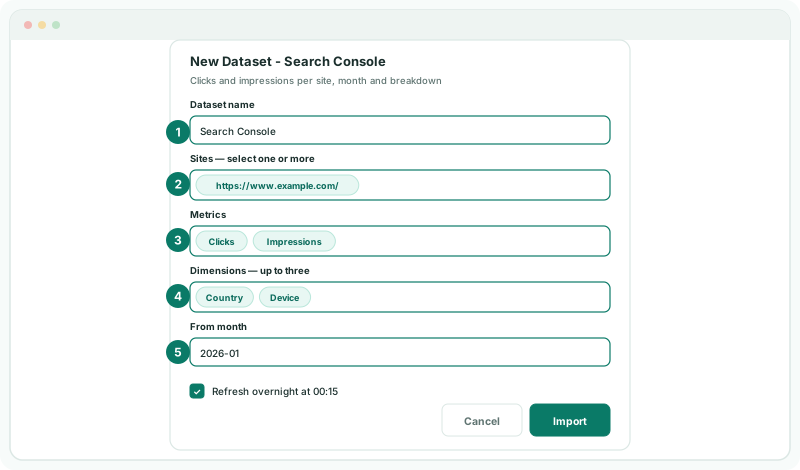
The breakdowns are Country, Device, Page and Query. Clicks and impressions are monthly totals, so they add up over a quarter or a year.
3Check the import
Check
Once the import has run, View data shows rows from Jan-2026 with the columns Site, Metric, Country and Device. Filter Metric to Clicks to read one measure at a time.
A company has one Search Console dataset. To change its sites, metrics or breakdowns, click Update Search Console dataset on its row. You can move From month earlier, not later.
4If something goes wrong
| What you see | What to do |
|---|---|
| A site is missing from the list | The Google login does not have access to it in Search Console. Connect with a login that does. |
| The Google authorisation has no offline refresh token | Click Disconnect Google, then Connect Google again and allow access. |
| An import is already queued or running for this dataset | Wait for it to finish, then update again. |
| The dataset stopped refreshing | Google was disconnected. Connect it again; the rows already imported are kept. |
Want more detail? See the documentation