
Operational Data · Track 1 · Tutorial 2 of 10
Create a dataset and upload a CSV
A dataset is set up in two steps: define it, then upload its data. BrizoConsol builds a CSV template from the definition, so the file you fill in already has the right columns.
You will needRights to manage data in Your Group, and monthly units sold by product in a spreadsheet.
By the endA Units sold dataset with a Product dimension, loaded with Sep-2026 and Oct-2026 from a CSV.
1Define the dataset
- Open Operational Data and click New Dataset, then Upload a file if a choice of source appears.
- In Dataset Name, type Units sold.
- Set Number of dimensions to 1 dimension and type Product in Dimension 1 label.
- Leave Account on No account, Scenario on one scenario, Actual, Period Weighting on Sum and Currency translation on No translation, and click Next.
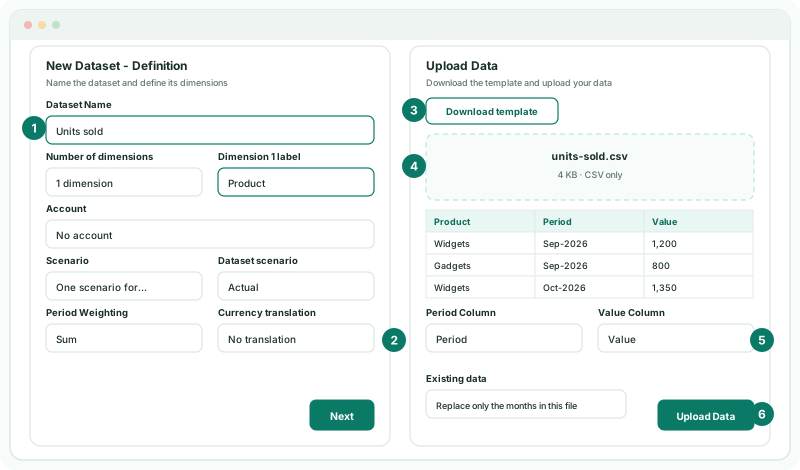
2Fill in the template
- Click Download template. It has the columns Product, Period and Value.
- Add a row for each product and month, such as Widgets, Sep-2026, 1200, and save the file as CSV.
Period takes a month such as Jul-2026 or 2026-07. In Excel, format the Period column as Text before you type, or Excel turns the months into dates.
3Upload it
- Drag the file onto Drag & drop your CSV here, or click to browse.
- Check the preview, and that Period Column reads Period, Value Column reads Value and the Product column is mapped.
- Leave Existing data on Replace only the months in this file, and click Upload Data.
Check
The dataset is listed in Operational Data with its row count. Click View data: the total value is the sum of the Value column in your file, and the period range runs from Sep-2026 to Oct-2026.
4If something goes wrong
| What you see | What to do |
|---|---|
| Rows could not be read, with dates in the first values | Excel turned the months into dates. Format the Period column as Text, type the months again, and upload. |
| No rows were imported | Check that Period Column and Value Column point at the right columns, and that Value holds numbers. |
| Next is greyed out | The dataset has no name. Type one. |
| The file is refused | Upload a CSV, within the size shown on the drop area. |
Want more detail? See the documentation