
MYOB Groups · Track 4 · Tutorial 1 of 2
See who owes what
BrizoConsol keeps a copy of your MYOB companies’ invoices and bills. Pulse turns the unpaid ones into a customer ageing, so you can see who owes what, and how late, without opening MYOB.
1Know where the figures come from
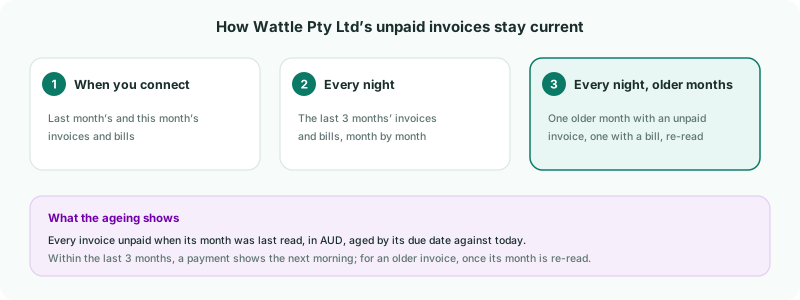
Each read takes in a month’s invoices and bills with their balances as MYOB holds them that day. The last 3 months are read every night, so a payment recorded in MYOB today shows tomorrow.
Older months are re-read a month at a time: each night, one older month that still holds an unpaid invoice, and one that still holds an unpaid bill. An invoice paid long after its month may take a few nights to drop out — or reload its month yourself, as in step 6.
2Open Receivables on Pulse
- Select Wattle Pty Ltd.
- Open Pulse → Receivables.
- Scroll to Aging Summary.
The top of the page — the health score, KPIs and balance trends — follows the month you choose. The Aging Summary doesn’t: it is today’s position, ageing each unpaid invoice from its due date to today.
3Read the ageing
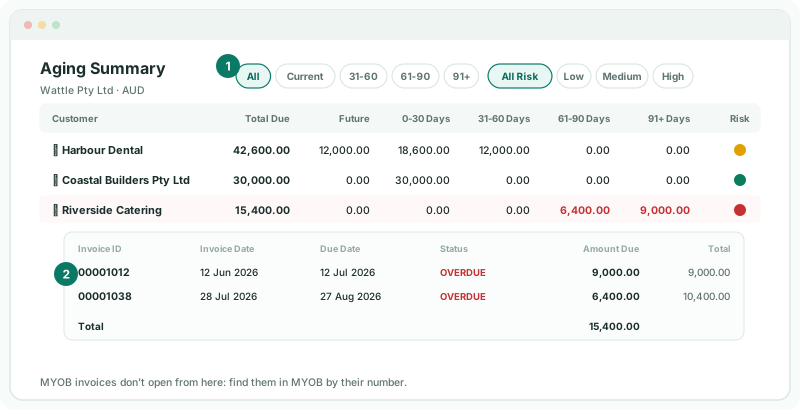
| Total Due | What the customer still owes, in Wattle Pty Ltd’s currency, AUD. A part-paid invoice counts only its balance. |
|---|---|
| Future | Not yet due. |
| 0-30 to 91+ Days | Days past the due date, today. |
| Risk | Low, Medium or High, from how late the customer pays on average, and how much they owe against the company’s receivables and against its revenue. |
Use the filters above the table to list only one age band — 91+, say — or only High risk customers.
4Open a customer’s invoices
- Click Riverside Catering. Its unpaid invoices open under it, with Invoice Date, Due Date, Status, Amount Due and Total.
- Find 00001038 in the list. MYOB invoices don’t open from here — MYOB doesn’t give BrizoConsol a link to them — so find it in MYOB by its number.
Invoice 00001038 was for 10,400.00; 4,000.00 has been paid, so 6,400.00 is due, 68 days late. Status shows OVERDUE rather than PARTIAL, because being late is what needs acting on.
Check
Riverside Catering’s invoices add up to its 15,400.00 Total Due, and MYOB shows the same balances on invoices 00001012 and 00001038.
Status is set when the invoice’s month is read. An invoice that has fallen due since then can still read OPEN; the age columns are always worked out against today.
5Look at the whole group
Select Your Group instead, and the Aging Summary lists the customers of every company beneath it. A customer that buys from two of your companies under the same name shows once, with both companies’ invoices.
Read companies in other currencies on their own. On the group, each invoice is added in its own company’s currency. Kauri Ltd’s NZD balances would be added to Wattle Pty Ltd’s AUD ones as they are, so select each company to read its ageing in its own currency.
Pulse → Payables works the same way for bills: who you owe, and when.
6If something goes wrong
| A paid invoice still shows | If the invoice is from the last 3 months, it clears after the next nightly read. If it is older, open Settings → Organisation Settings → Data Loading and load its month with Invoices ticked. |
|---|---|
| Nothing has updated for days | The MYOB connection may have expired. If the company shows Token expired in the Organisation Hierarchy, click Reconnect Now there. |
| Unknown balances: … | Some invoices came in without a balance, so totals and ageing leave them out. Reload the months they are in. |
Want more detail? See the documentation