
Local GAAP Groups · Track 1 · Tutorial 2 of 2
Classify profit and loss and cash flow lines
Available on ProPremium
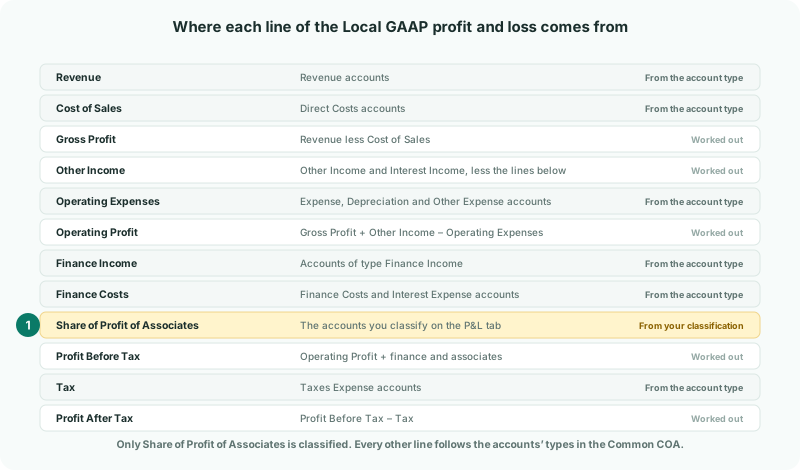
The Local GAAP profit and loss reads almost every line from the accounts’ types, so there is little to classify there. The Local GAAP cash flow statement shows each investing and financing flow, and reads those lines from the accounts you classify.
1Know how the lines are filled
| Profit and loss | Every line except one comes from the type of each account in the Common COA — Revenue, Direct Costs, Expense, Depreciation and so on. The exception is Share of Profit of Associates, the only P&L classification Local GAAP has. |
|---|---|
| Cash flow | Each investing and financing line is the year’s movement on the accounts you classify. The operating section is worked out from profit, depreciation and working capital, and needs no classification apart from Gain/Loss on Disposal. |
| What isn’t classified | The statement still ends at the bank balance. A movement that isn’t on any line shows in Effect of FX on Cash, which is the difference between the change in cash and the three sections. |
2Check the profit and loss lines
Because the lines follow the account types, an account on the wrong line is fixed by changing its type in the Common COA, not on the Accounting Standard page.
| Line | Accounts of type |
|---|---|
| Revenue | Revenue. |
| Cost of Sales | Direct Costs. |
| Other Income | Other Income and Interest Income, less Finance Income and the share of profit of associates, which have lines of their own. Interest income is part of operating profit here. |
| Operating Expenses | Expense, Depreciation and Other Expense. Finance costs are typed Other Expense too, but they stay on Finance Costs. |
| Finance Income | Finance Income. |
| Finance Costs | Finance Costs and Interest Expense. |
| Tax | Taxes Expense. |
On the Accounting Standard page, the P&L tab has one line, Share of Profit of Associates: the account your share of an associate’s profit is posted to. Your Group has no associate yet; this line is set in Account for associates and joint ventures. Its warning sign stays until then.
3Classify the cash flow lines
- Select Your Group, and open Settings → Organisation Settings → Accounting Standard.
- Under Account Classifications, choose CF in the Type column. The lines are grouped into Operating, Investing and Financing activities, each with how many of its lines have an account.
- On each line your group uses, click Select accounts, tick the account in Select Cash Flow Accounts, and click Apply.
- Click Save Changes.
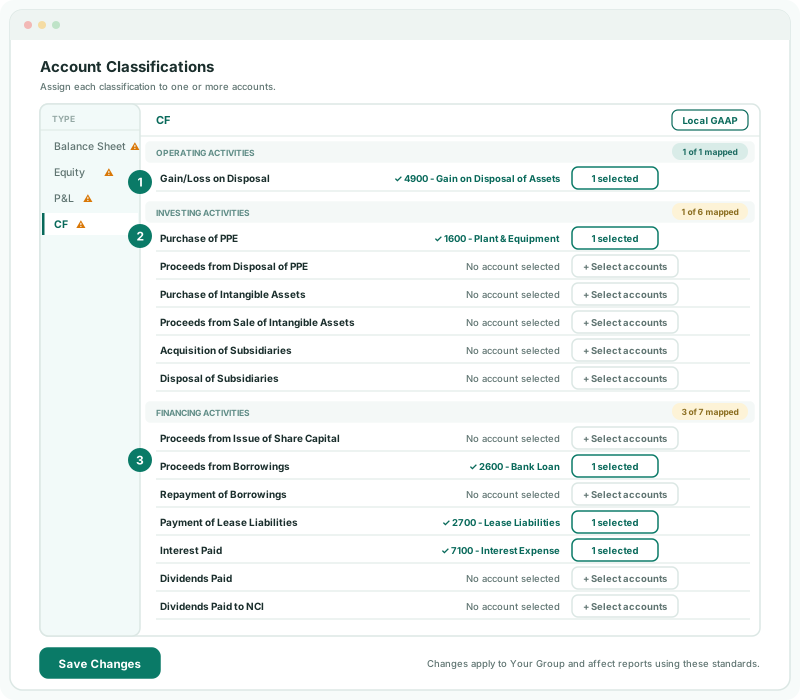
Choose the account whose movement over the year is that cash flow:
| Line | Your Group’s account |
|---|---|
| Gain/Loss on Disposal | 4900 Gain on Disposal of Assets. The gain is taken out of operating cash flow because it isn’t cash. |
| Purchase of PPE | 1600 Plant & Equipment, the cost account. Its increase is the year’s purchases when nothing was sold. |
| Purchase of Intangible Assets, Proceeds from Sale of Intangible Assets | The intangible asset cost account, and the account the proceeds of a sale are recorded in. Your Group has none, so these stay empty. |
| Proceeds from Borrowings | 2600 Bank Loan. |
| Payment of Lease Liabilities | 2700 Lease Liabilities. |
| Interest Paid | 7100 Interest Expense. The Local GAAP statement adds finance costs back in the operating section and shows the interest paid under financing. |
| Dividends Paid, Dividends Paid to NCI | The accounts dividends to the owners, and to non-controlling interests, are booked to. These two lines also feed the Dividends rows of the statement of changes in equity. |
A cash flow line is a second classification: an account can be on one Equity or P&L line and also on one CF line. So an equity account keeps its equity line and can be given the financing line its movement belongs to — for a share issue, 3000 Share Capital on Proceeds from Issue of Share Capital. Putting an account on two CF lines, or on two Equity or P&L lines, gives The same account cannot be used for multiple classifications within the same standard. when you save.
4Check the statements
- Open Reports → All Reports → Consolidated Statement of Profit or Loss for 2026, and the group’s Profit & Loss for the same year.
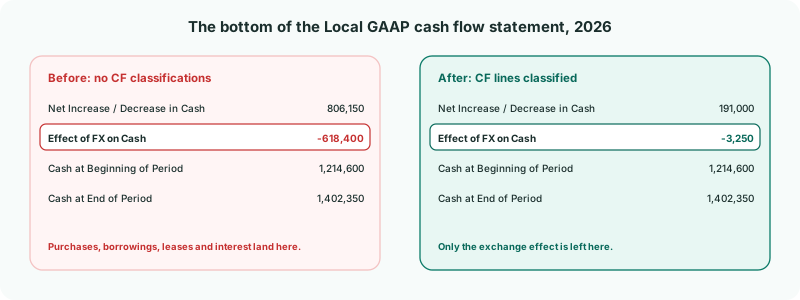
- Open Consolidated Statement of Cash Flows for 2026, and look at the bottom of it.
Check
Profit After Tax on the Local GAAP profit and loss equals Net Profit on Profit & Loss. On the cash flow, Effect of FX on Cash is down to -3,250, a size that fits Company B’s and Company C’s cash being translated, and Cash at End of Period is 1,402,350, the bank balance.
5If something goes wrong
| Effect of FX on Cash is still large | A movement isn’t on any line — often a new loan, or an asset bought into an account that isn’t classified. Find the account that moved and put it on its line. |
|---|---|
| An account is on the wrong profit and loss line | Its type in the Common COA is wrong. Change the type; the line follows it. |
| The same account cannot be used for multiple classifications within the same standard. | One account is on two CF lines, or on two Equity or P&L lines. Keep it on one of each. |
| [Account] is an equity account, so it cannot be assigned to a P&L classification. | The account was changed to an equity account while this page was open. Reload the page: the account is no longer on the P&L line, and the save goes through. |
Want more detail? See the documentation