
Dashboards and KPIs · Track 5 · Tutorial 2 of 2
Use the Daily Brief
The Daily Brief picks out what moved materially since last month — performance, budget variances, the companies behind them — so you don’t have to scan every dashboard to find it. It opens in BrizoConsol and links to the screen for each finding.
1Open the brief
Your Daily Brief opens by itself on your first visit of the day. To open it at any time, click the bell at the top of the screen, then Daily Brief.
The line under the title names the group, the reporting month and the month it is compared with: Your Group · Oct-2026 · compared with Sep-2026. A user who can only see one company gets a brief for that company.
2Read the findings
- Filter by All, High, Medium or Low.
- Click a finding to open it: its explanation, the month, the companies behind it, and a link such as View to the screen to act on it.
- Click Continue to close the brief.
A movement is reported only when it is at least 5% and at least 5,000 in the group’s currency, with up to four findings per category. With nothing material, the brief says No material group-level changes or consolidation exceptions were identified. Product updates lists BrizoConsol news.
3Choose what it covers
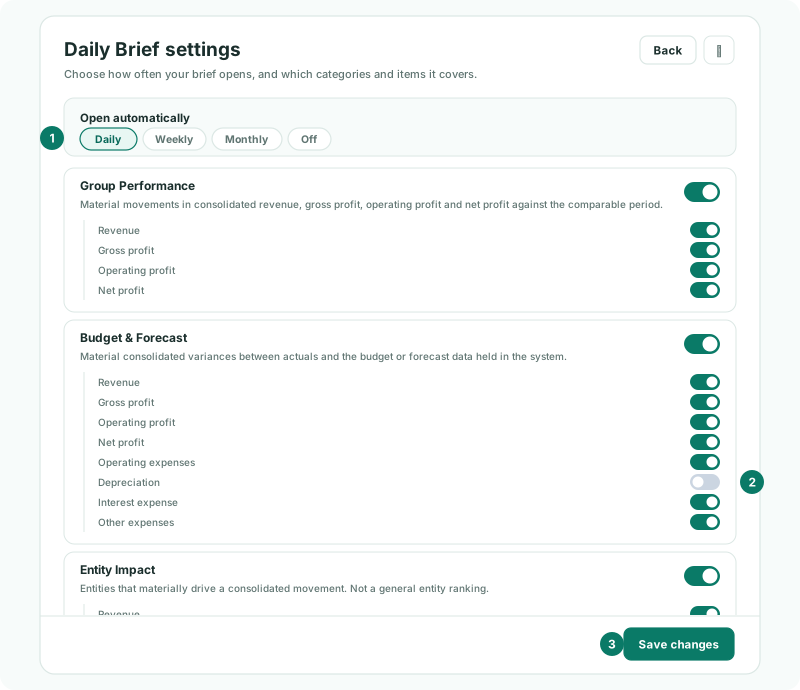
- Click Settings.
- Under Open automatically, choose Daily, Weekly, Monthly or Off.
- Switch categories on or off, and the items within them, such as Depreciation under Budget & Forecast.
- Click Save changes.
| Group Performance | Revenue, gross profit, operating profit and net profit against last month. On by default. |
|---|---|
| Budget & Forecast | Variances against the budget or forecast. On by default. |
| Entity Impact | The companies that drive a group movement. On by default. |
| Intercompany | Differences, unmatched balances, eliminations posted and unconfirmed reviews. Off by default; Pro and Premium. |
| Balance Sheet | Cash, receivables, inventory, payables, borrowings, equity and retained earnings. Off by default. |
| Consolidation | CTA / FCTR, NCI, ownership changes and consolidation adjustment journals. Off by default. |
| System warnings | Connector, sync, mapping and account-setup warnings. On by default. |
| What’s New | BrizoConsol news from the last 28 days. On by default. |
Settings are yours alone. A category marked Pro is not in your edition; one marked Group applies only to the whole group.
Check
The brief is rebuilt with your selection and includes a Balance Sheet section when there is a material movement. With Off chosen, it no longer opens by itself, but the bell still opens it.
4If something goes wrong
| What you see | What to do |
|---|---|
| The Daily Brief is unavailable for this organisation. | Select a company of a group you can report on. |
| There is no Daily Brief in the bell | The brief is for the subscription owner and users with report access, not data-entry roles. |
Want more detail? See the documentation