
Operational Data · Track 2 · Tutorial 3 of 8
Translate money datasets into the group currency
A dataset holds figures in the currency of the company that owns it. When the group reads a money dataset from a company in another currency, each row has to be translated first. One setting on the dataset decides how.
1Choose the translation
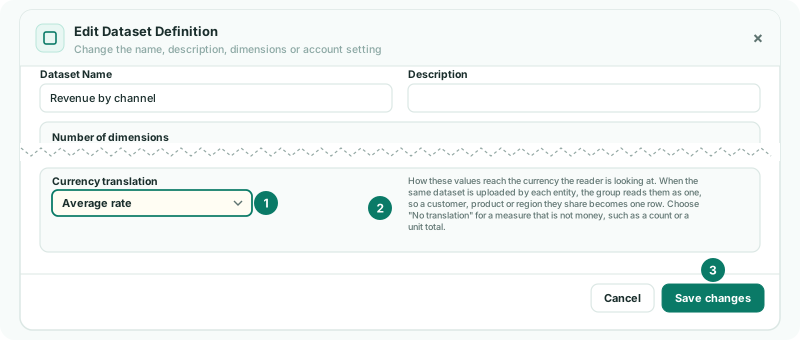
- Select Company B, open Operational Data, click View data on Revenue by channel, then Edit definition.
- Set Currency translation to Average rate, and click Save changes.
| Choose | For |
|---|---|
| Average rate | Money earned or spent over the month: revenue, payroll, orders taken. |
| Closing rate | Money held at the month end: order book, deposits, stock value. |
| No translation | Anything that is not money: headcount, units, hours. The default. |
The dataset list shows an Average rate or Closing rate badge beside a translated dataset.
2Know how a row is translated
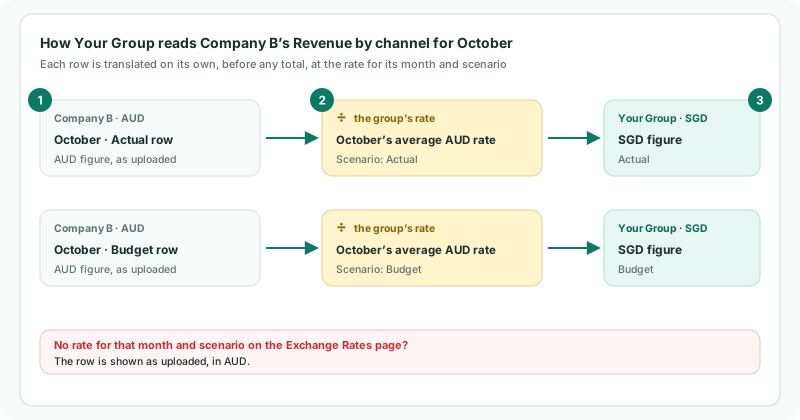
Each row is translated on its own, before any total, at the group’s rate for that row’s month and scenario: an Actual row at the Actual rate, a Budget row at the Budget rate. The figure is shown in the currency you are reading in, the display currency you chose or the company’s own.
Check
Select Your Group and read Revenue by channel in a dashboard or report. Company B’s October figure equals its AUD figure divided by October’s average AUD rate, as on the Exchange Rates page.
3If something goes wrong
| What you see | What to do |
|---|---|
| A month reads as if it were not translated | The group has no exchange rate for that month and scenario, so the row is shown as uploaded. An operational report names the missing rate above its grid; dashboards and row/column reports show no warning. Load the rate. |
| Currency translation is not included in the Standard edition. | Translation needs Pro or Premium. On Standard, keep money datasets to companies in the group’s currency. |
| Headcount is changed by exchange rates | The dataset is set to a rate. Set Currency translation to No translation. |
Want more detail? See the documentation