
Operational Data · Track 3 · Tutorial 7 of 7
Use a model across BrizoConsol
A model publishes its figures as an operational dataset. Everything that reads operational data reads a model the same way, so once it is saved there is nothing more to set up.
1Find the model’s dataset
- Select Your Group and open Organisation Settings → Operational Data.
- Find Units and revenue. It carries a Model badge.
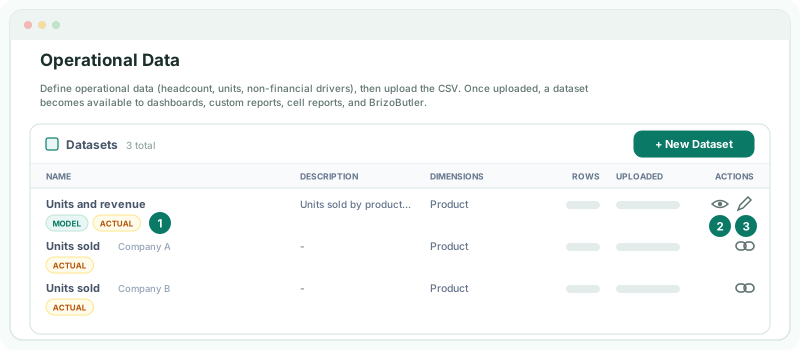
The dataset is the model’s output. Its figures are changed in the model: Edit model opens the model page, and nothing can be imported into the dataset. Renaming the model renames the dataset; deleting the model deletes it.
2Use it like any operational data
Wherever operational data can be chosen, the model’s dataset is offered under its name.
| Where | How |
|---|---|
| Dashboards | Choose the dataset as a widget’s data source, as in Show operational data in dashboards and Insight Packages. |
| Row/column reports | Add a row from it, as in Add operational data rows to row/column reports. |
| Cell Reports | Bind a cell to one of its metrics, as in Bind operational data in Cell Reports. |
| Custom KPIs | Use a metric in a formula, as in Build KPIs from operational data. |
| BrizoButler | Ask about it by name. |
Check
A dashboard widget on Units and revenue shows the same Units sold for a month as the model’s View.
3Know when it refreshes
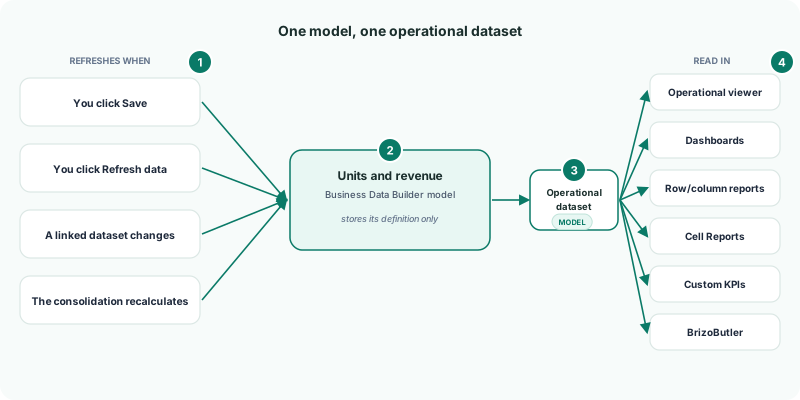
| When | What happens |
|---|---|
| You click Save on the model page | The model loads its data again. |
| You click Refresh data on the Models list | The model loads its data now. |
| A linked dataset changes | Every model that reads it refreshes. |
| The consolidation recalculates | Models that read financial statements refresh. |
A refresh replaces all the model’s figures at once, so a reader sees the previous figures or the new ones, never half of each.
4If something goes wrong
| What you see | What to do |
|---|---|
| The dataset isn’t listed | The model has not published its data yet. Wait for Up to date. |
| New figures haven’t reached a dashboard | The model is still loading. Check its badge on the Models list, or click Refresh data. |
| The dataset disappeared after the trial | The subscription no longer includes the Business Data Builder. The model is kept; upgrade to Premium to read it again. |
| You can’t upload into the dataset | A model’s dataset is changed in the model. Click Edit model. |
Want more detail? See the documentation